

THE MUSICAL MUSE
Blog dedicated to music education, practice tips, health
&
wellness, and geeking out.
Fixing My Case of WordPress Database Bloat
Last week, my WordPress Multi-site network went down - again. Some research revealed that I had a case of WordPress Database bloat. I had to delve deeper in the IT world than I have ever gone before to fix it.

As some of you know, I've run into a few issues with my website this year. Let's just say that I've seen that "Internal Server Error" message more times in the past two months than I ever want to see.
Last week, everything went down - again. The main website, as well as aspects of all seven blogs. I contacted my webhost, Tera-Byte Dot. Com, and they informed me that I had over 220 database tables and over 7000 files. This slows things down to a grinding halt. The support team advised me to start going through the WordPress Support documentation, but to also be prepared to delete everything and start from scratch.
Words no blogger or website owner wants to hear.
I whined to my brother and colleague before taking the next step. That's when he asked, "Have you read any of the documentation on "database bloat"?"
Database what?
A quick Google search revealed 108,000 hits for "WordPress Database Bloat". Strangely, I was relieved to hear that my websites had a common affliction. At least, I had my starting point and I did not have to blow all my sites to smithereens and start from scratch. I was off to find helpful tutorials.
First, I followed Kimberly Castleberry's instructions in her article Is Your WordPress Blog More Than 2 Years Old? Fixing Database Bloat Issues!This required me to be a brave trooper and log into MySQL and pHpAdmin. With 220+ tables, I was glad that Ms. Castleberry spelled out what I needed to delete.
Once I completed that, I was able to log into my WordPress network admin dashboard. You can imagine how relieved I was to be able to do this.
Next, it was time to prevent this mess from happening again. I found Narga's article Prevent Hidden Causes by Clean up WordPress Database Bloat Issues. I decided to purchase and install GDragoN's WordPress plugin Smart Cleanup Tools as it is compatible for WordPress Multi-site installations.
Perhaps if I only had one website to maintain, I would have taken the most secure route of doing my website database maintenance in MySQL and pHpAdmin. However, you have to keep in mind your skills and the time you have available to deal with such things. Using Smart Cleanup Tools on all my WP sites saves me time and headaches.
I already mentioned that it is WP-MU compatible. The other thing I like about it, is that Smart Cleanup Tools allows you to schedule database clean-up at regular intervals at the click of a button.
The final thing that I did to help manage my database size is limit revisions of posts. One of the reasons that I had over 7,000 files is that WordPress dutifully saved everything! Every spam comment, every comment, every auto-save draft and every revision.
I used this Revision Control plug-in which is specifically for multi-site installations. If you only operate a single site, then use this one.
Fellow entrepreneurs, please note that you will only battle database bloat if you have a self-hosted WordPress site. If your website or blog is hosted on Wordpress.com, then WP takes care of all this for you.
However, most WP users who are uses WordPress for business will have a self-hosted website or blog through WordPress.org . More control, many cool design templates to choose from and the clincher for me: the ability to control operate all my blogs and my main site in a single network.
Those in the same Wordpress.org boat as me will have to tackle database bloat sooner rather than later. They will also have to clean up their databases on a regular basis.
So far, everything has been working smoothly. Page load times have sped up incredibly, so it seems that my website and blogs have been cured of database bloat. Now, I can put my IT hat down for a while and put the teacher/consultant hat back on, thanks to WordPress Support forums, Narga, Kimberley Castleberry and GDragoN.
Arpeggio Warm-Up Exercise
This is my fave piano warm-up these days: arpeggios.
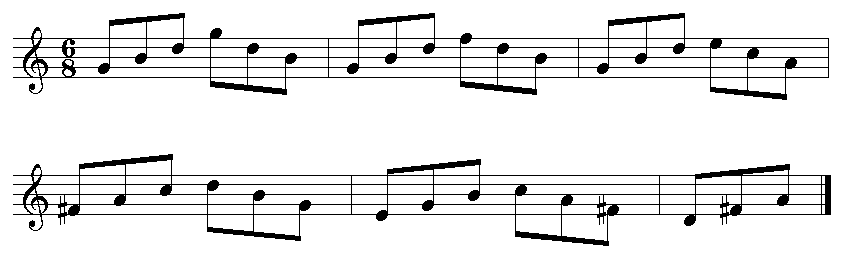
This has been my favourite warm-up exercises lately. After playing the piano for over 30 years, you have to come up with different practice drills to keep things fresh.
First, I start by playing a one-octave arpeggio (eighth notes). I start slowly and as soon as I hear that I'm playing evenly, then I branch out to two octaves (eighth notes), then three (eighth note triplets) and then finally four (sixteenth notes). Sometimes, I have to repeat a particular stage three or more times before I hear that I'm playing evenly.
For an added challenge, I change the articulation: staccato, legato, portato or slurred. Then, for a bonus, each hand will play a different articulation.
Beginner piano students can just stick with one-octave arpeggios. Junior intermediate students can branch out to two-octaves. Upper intermediate students can go up to three octaves, while advanced students should go up to four octaves.
Here's a video demonstration:
Attempting to Improve My Memory
A lady I knew had an incredible knack for remembering the name of nearly every person she met. I'd like to improve my short-term memory so that I can remember names and things better. I try out a memory mapping exercise - and it works!

Have you ever been to a party or business function where you met a bunch of people, and forgot the name of the first person by the time you were introduced to the fourth? You're not alone, if my Google searches on the topic indicate.
I came across a neat article a few weeks ago on Buffer App's blog, entitled, "How to Never Forget the Name of Someone You Just Met: The Science of Memory". Like my students, I rely on writing something down "so I don't forget" or putting a reminder in my smartphone.
However, as the author Kevan Lee indicates, that's not really remembering. All we're doing is delegating the task of remembering to the object we inputted the information into.
Intrigued by some of the exercises to improve memory, I decided to try the memory mapping technique. On September 14, I chose my studio as the room to put everything/everyone in. On the first day, I used the technique to remember my errands of things to pick up : the cymbal was doing Jumping Jacks on the couch, the fridge was trying my new outfit and then put it inside itself, Maestro's vitamin powder was strewn all over my keyboard's keys, the Virgin Mary was praying the Rosary atop my wall screen (Miraculous Medal), the retro player ate my fruit salad, my frequent shopper cards were doing the conga at my computer station, the piano keys were replaced by tampons, the bookcase was playing with my cheques before taking them to the bank and my CD stand was trying on my jewelry. It's been over two weeks and I still remember that list of nine items because the images are simply ridiculous.
I'll keep using this technique as it appears that I did improve my short-term memory (to the point that it converted into a long-term memory!). I do hope to try some of the other exercises the next time I remember to read the article.
If you would like to improve your memory, check out these articles: Exercise Your Brain, Mental Exercises to Help Improve Your Memory and the Top 10 Ways to Improve Memory
My First FallCon
It was short but sweet. My first FallCon was an adventure that was the highlight of my tabletop gaming extravaganza weekend.
I first heard about FallCon two years ago through one of my friends in Japanese class. At the time, I was intrigued, but for whatever reason, didn’t go. This year was different. Over the summer, I explored some new tabletop games with friends and at GeekMoot. I wanted to explore more games.
It would have been nice to attend the entire convention (September 27 - 29, 2013) but alas, time is so short. I only had time to attend the session on Saturday afternoon. Since it was my first time, I decided to register for Open Gaming.
This was a little different from GeekMoot. Upon registering for FallCon, you are basically reserving a seat, which becomes especially important when one of the featured games is running. You can see how many spaces are available at a table when you view your account. Or, if you're on the waiting list, you can see what position you are in.
It was just an adventure getting there. The venue is on the opposite end of town from where I live. Couple that with the fact that I was coming up from High River where I was visiting family - combo that with Deerfoot Trail being reduced to single lane traffic, starting at 22X - level that up with the fact that the detour ended in me overshooting my destination and backtracking through neighbourhoods I never knew existed - and you get one grumpy panda.
Now, don’t you tell me to turn on Google Navigation. My Android doesn't really get along with Google Maps or Google Navigation and I prefer using landmarks. Besides, I’m a hard copy map gal in the end. Guess what I forgot to print off that morning?
I was relieved to finally pull into the very full parking lot at the Commonwealth Centre and even more relieved to meet up with a friend’s hubby in the parking lot. He gave me the lay of the land upon entry: vendors here, food there, registered games right by the vendors and open gaming tables as far as the eye could see. In the very far corner, my friend and other volunteers were busy at the Games Library.
Speaking of the Games Library, what an impressive sight! There were over 690 tabletop games (some multiples). What was even more amazing was the fact that the majority of those games belong to one person.

My first stop was to the two vendors. The one game I didn’t purchase during my shopping spree was King of Tokyo. I’ve been itching to stomp around, kaiju style ever since GeekMoot but Imaginary Wars and Sentry Box were sold out when I went. I bought it from Boardgames.ca .
We caught up with my friend and then went in search of a table looking for players. These tables were denoted by an orange cone. Other tables sported a red cone, which meant that the players were in search of a teacher.
First up: Tzolk’in: The Mayan Calendar. The basic premise is similar to some games that I’ve played - build your kingdom/domain/land, gather resources, care for your people. However, the layout is quite different:

There’s a quite a bit more to the game. I was actually glad that our teacher (my friend’s hubby) had to explain the game three times, although I did feel badly for him. Since I was the first newbie at the table, I got the spiel, with added information, three times. Once he finished giving the rundown, another person showed up and then another.
There are six interconnected gears. On your turn, you can either place your workers on the lowest available spot in a wheel, or take them off so that you can reap the benefit granted for being in that spot. The wheels turn as the calendar advances, so your workers go around, stopping at different spots. It’s a waiting game to obtain a particular item, be it a building resource, corn to feed your workers, the right to build, an extra worker, etc.
Through all the action, you are trying to gain Victory Points. These are achieved in various ways, such as erecting buildings and temples, traversing the big blue wheel and moving up the temple levels as you gain favour with the Mayan gods.
Make sure you keep enough corn to feed your people otherwise, you will lose favour with the gods. I wound up with negative points for a while because of that.
If you need extra corn, one way you can get corn is to take control of the Headdress. You gain whatever corn has built up in the kitty AND you get control of the calendar. You can move time forward one day or two. You can also move the calendar backwards, in hopes of positioning your workers in a better spot on the gears.
It’s a neat game, but we three newbies readily agreed that it’s hard to get our brain around. It’s a game I’d like to try a few more times with a more experienced player as a guide before attempting to play it with me trying to be the coach.
It’s also one of the longer games too. The Boardgame Geek estimates gameplay at 90 minutes.
While we were playing, my nose was bombarded with delectable scents from the kitchen. People were ordering not just burgers and fries, but lasagna and Shepherd’s Pie. Oh so yummy. However, I made do with popcorn as I had dinner plans.
Next game: Bruges (pronounced “broozh” or “”brugguh”). It’s a city in Belgium. The game is set in Bruges during the Renaissance. Players are wealthy merchants competing to be Number 1. This is achieved by earning a high reputation on the scale, building as many buildings and canals as you can and having as many highly valued people out in your neighbourhood.
I was joined by a gentleman from BC and two ladies. The two ladies were familiar with the game.
Gameplay consists of four phases. In the first, we built our hand from the two decks of cards. The cards have colour-coded houses on one side and people on the other.
Phase 2 involves Player 1 rolling the coloured dice. The colours correspond with the works and the houses. If a player rolls a “5” or a “6”: watch out! Everyone gets struck with misfortune, such as pestilence or fire, earning a Threat Marker. Then, players can decide whether or not they want to pay the fee shown on the designated die to move up the Influence (or “Reputation”) Track.
In Phase 3, the players go around the table, playing their hand. Players can build canals or buildings, recruit workers, put workers in their buildings and activate an action listed on a card that’s in your neighbourhood.
In the final phase, players determine “majorities”. That is, you determine who’s the winner of that round in terms of canals, people and influence.
The decks are then passed to the next person. He or she becomes the Player 1 for the new round.
It’s straightforward enough. In some ways, I like it better than Dominion because of all the extra parts. You have your workers, gilder, cards and game piece. The combination of using cards and dice is neat as well.
Gameplay is listed at 60 minutes, but I’m sure we took longer than that. I think we were actually closer to 90 minutes. We missed out on the auction (which sounded quite lively). However, we were all committed to completing the game.
My first FallCon was short and sweet. The registration process was straight forward. The scheduling was varied. The cone system was brilliant. That Games Library simply blew me away. Everyone I played with or spoke to was extremely friendly and helpful.
And so ended my first FallCon experience, but not my gaming weekend. You see, my tabletop extravaganza began Friday night with a game of Pandemic. My brother and I wanted to see if we could save the world in a two-player scenario. Not only did we develop cures for all four dreaded diseases, we decided to keep playing until we eradicated all those nasty cubes from the world map.
The outbreaks started in Asia. We decided that it was fitting that we end up back in Asia. After we traversed the globe, treating and curing the world of Bugger Black, Bad Blue, that Darn Red and the Pesky Yellow diseases, we met up in Tokyo so our game pieces could party it up in Akihabara.
Sunday, we cracked open King of Tokyo. It was a fierce family fight amongst our kaiju, with each member employing a different gaming strategy. It was a bloody battle, coming back from 3 HP, but Mekka Dragon and I were victorious.

Now, it’s another year until FallCon 27. Thankfully, there are various tabletop gaming meetup groups, Gamer Sundays at Dickens’ Pub and of course, as many gameplay opportunities we can squeeze in with family and friends.
If you’d like to check out any of these games, head to a specialty gaming store. In Calgary, we have several, including Imaginary Wars, Revolution Games and Music and The Sentry Box. Otherwise, check out Amazon (click on the game links above) or GermanGames. If you have a favourite tabletop gaming store, feel free to share in the Comments section.
Author Interview with Grant Spink
Author Grant Spink discusses reading, writing and his first book, How to Publish Your App.
How to Publish Your App is a concise guide for new app developers wishing to publish their app in the App Store. While researching this topic, Spink discovered that a how-to guide for publishing apps did not exist, requiring extensive research to figure out how to publish his iApp.
Author Grant Spink shares his lessons, tips and tricks on the process of publishing an iOS app in his first book.
Grant Spink on Writing How to Publish Your App
The Musical Muse: What inspired you to write How to Publish Your App?
Grant Spink: When I was making my app, I just turned 14 but I could code pretty well, so I was surprised that once I was finished here was nothing really out there that described in simple detail the publishing process. So after I finished developing the app, and publishing it myself, I wrote a definitive guide that would help any individual glide through what I had such trouble with.
The Musical Muse: What was the hardest part about publishing your book?
Grant Spink: The formatting and preparing it to be delivered as an actual book on Amazon. There were strict guidelines that had to be followed, and it took the greatest deal of time in the publishing process.
The Musical Muse: What did you learn from writing your book?
Grant Spink: I learned how much I like writing. I feel that I really have an interest in doing more books to help people, or even some creative fiction writing.
Grant Spink on Poli-tic-tac-toe
The Musical Muse: Tell us a little bit about the app you created.
Grant Spink: I created a series of apps spoofing the political elections in a satirical way. The first one was called poli-tic-tac-toe, it pitted Obama and Romney against each other in a game of X's and O's.
Grant Spink on Favourite Books and Authors
The Musical Muse: What genre of books do you like to read?
Grant Spink: I love to read; Right now I'm reading Freakonomics by Steven Levitt, but I enjoy being transported to a distant land, and hearing an interesting story. I like Hemingway, Cormac McCarthy, but lately I've been reading a lot science fiction.
Grant Spink on Becoming a Published Author
The Musical Muse: Did you ever think you'd ever become an author?
Grant Spink: I never really thought I would become an author. Although, my interests focus primarily on creating things, whether it be apps, drawings, models, music or even books now, I guess. I'm currently developing a new way to teach computer science to children and beginners all over the world, which I'm planning to turn into a series of books and online videos.
Grant Spink Encourages Other Young Authors
The Musical Muse: You're what we call a "young author". Do you any advice for youths about writing or developing apps?
Grant Spink: First, you have to believe in yourself, and have confidence in your ability to overcome any roadblock and complete any task you set your mind to. The most important thing is to finish it, and just chipping away at it will get you there eventually.
One thing that I found impressive is that Grant's father, director Philip Spink, said that Grant was halfway through writing How to Publish Your App before he and his wife were aware of what Grant was up to. Now that's showing initiative!
How to Publish Your App Publication Details
Author: Grant Spink
Title: How to Publish Your App
Paperback: 122 pages
Publisher: Grant Spink
Publication Date: May 28, 2013
ISBN-10: 0991918304
ISBN-13: 978-0991918300
How to Publish Your App by Grant Spink is currently available on Amazon.Check out my book review of How to Publish Your App and Grant Spink’s site, Publish Your App.
Social Media Links
archives
- #YYCArts 32
- #YYCEvents 39
- Collaborative Music 25
- Community 11
- Composing & Arranging 6
- Entertainment 139
- Entrepreneurship 53
- Freebies 3
- Gardening 1
- Geeking Out 65
- Health & Wellness 120
- Improvisation 25
- Interviews 28
- Learning Music 188
- Martial Arts 13
- Memorization 7
- Music 230
- Music Careers 9
- Music Education 196
- Music Examinations 7
- Music Exploration 55
- Music Gigs 14
- Music Lessons 6
- Music Performance 32
- Music Theory 13
- Musical Instruments 12
- Musician Health 19
- Pets 57
- Piano Technique 12
- Practicing Music 120
- Productivity 20
- Professional Development 11
- Recommendations & Reviews 93
- Recreation 71
- Social Media 6
- Spirituality 10
- Studio Management 33
- Studio Technology 50
- Teaching Music 146
FOLLOW THE STUDIO on Instagram








Affiliate Links
As a Sheetmusicplus and CD Japan affiliate, I earn from qualifying purchases. The earnings help fund the Studio’s blog and YouTube channels. Your support is greatly appreciated.


FOLLOW Budo no Tabi on Instagram









