

THE MUSICAL MUSE
Blog dedicated to music education, practice tips, health
&
wellness, and geeking out.
Training Students to Become Active Listeners
Teaching my students how to become active listeners is tedious but a necessary step in teaching them how to practice more efficiently.

When I was growing up, I studied piano with Miss Mahaffy. She took me from Grade 3 to Grade 9 piano. After running though a piece, she would usually comment on how I did. More often than not, my dynamics were flat or my playing was choppy. Then she'd ask me, "Did you listen to what you just did?" Usually, I'd say, "No," or "Not really." She would dutifully write, "Listen to yourself!" in my assignment book.
Fast forward to 2013. After hearing a student, usually I ask them, "What did you think? How did you sound?" Their response is eerily similar, "I don't know. I wasn't listening." To which I reply, "Well how do you know if you're getting any better if you don't listen to what you're saying?"
My strategy to teach my students to become active listeners is two-fold. I rely heavily on the technology on hand: my YouTube Music Exploration Play List and Record & Review.
Every week, I highlight a "Clip of the Week". I've been doing this for several years now. My students have an Active Listening Handout, although I really should just keep one at the piano to save time. While watching and listening to the clip, I ask them questions such as, "What instruments do you hear?", "What's the tempo like?", "Is the song major, minor or something else?" and "What's the articulation?"
The one thing that I've been employing more regularly is recording my students and having them listen to themselves.I record them onto my computer using Audacity. Any recording device will do: mp3 player, camera or phone.
I ask them to draw a star on any spot in the score in which they heard a bobble. Some students are really good at it, so I just have to talk about various practice drills and the end goal.
I have a group of students who don't really listen to themselves when they play. However, they realize what needs work only when we do the Record and Review.
Unfortunately, many of my students are weak in this area, and I want to fix that. Sometimes, I have to record them playing through a spot, record myself playing the same spot and have them compare the sound and the waveforms.
With guided questions (and a few replays), I can usually get my students to pick out one trouble spot that I'd like them to work on for the week. Once we select the most critical issue, I have them pull out their Bag of Tricks so that we can work on that spot.
This evening, I recorded a nine-year old student as she drilled a trouble spot. I played each recording for her and asked her to assess herself. We probably spent 10 minutes recording and reviewing until I felt confident that she knew what to listen for at home and that her practices will be better organized.
Basically, I'm walking my students through how to practice music efficiently. It's very tedious, especially when you take into account that I've been doing this with most of my students for the past couple of weeks. I do feel that this will pay off in the end. If I can successfully teach my students active listening skills, then they have a better chance of succeeding at self-regulated practicing.
It is my hope that well before the end of the school year, when I ask them, "What did you think? How did you sound?", they all will be able to assess their playing accurately and objectively. Then, I can focus on helping them progress with their musicianship and expression.
Learning to Speak Dog
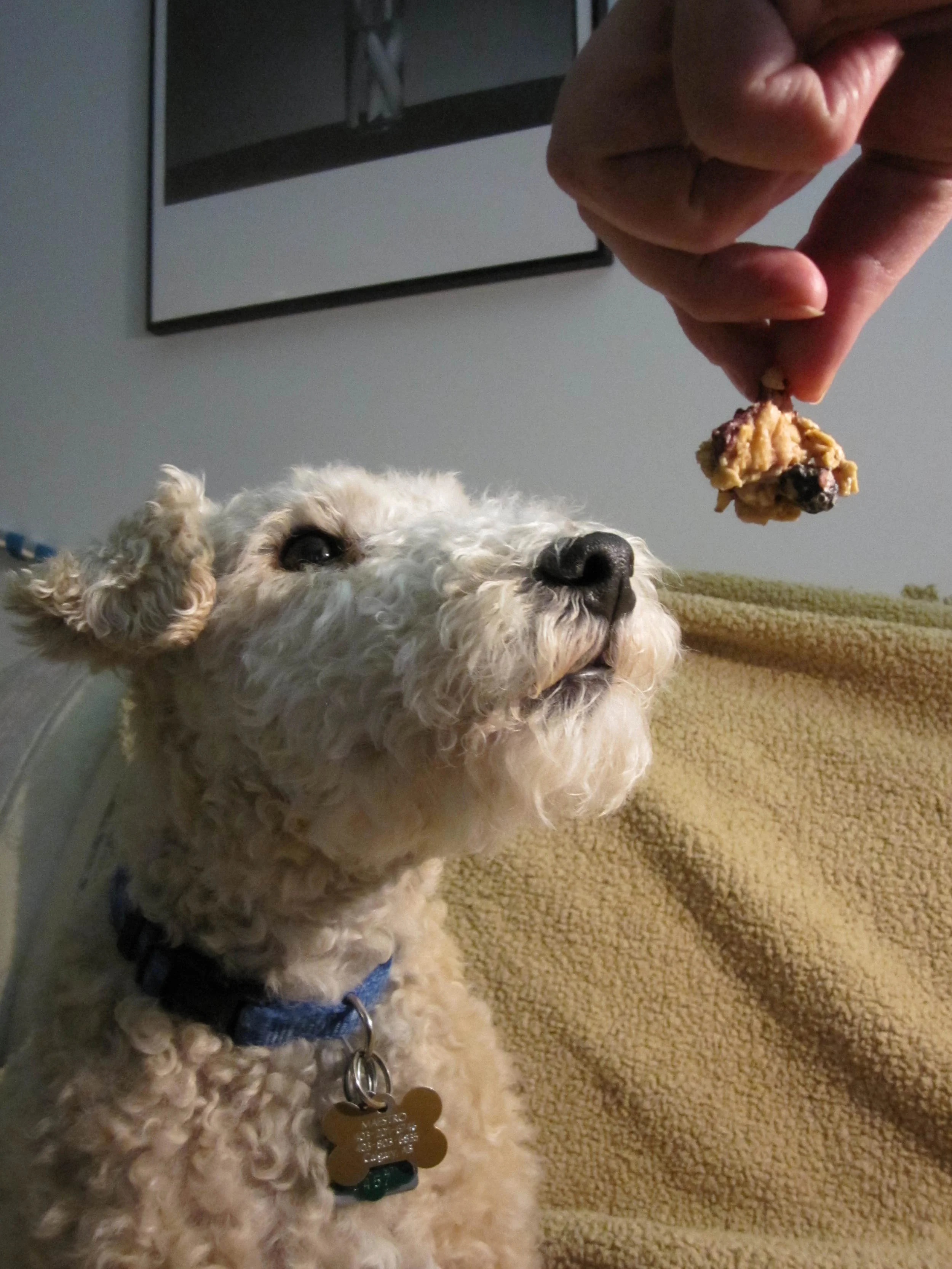
A common question my students ask me is, "What is Maestro saying?" Most of the time, I can interpret what my dog is saying by interpreting his body language and listening to the inflection of his voice.

Sometimes, my students ask me, "What is Maestro saying?" Usually, I'm able to answer them. I've interpreted my dog's body language and vocal language as follows: Maestro's Work-Related Vocabulary
"When's Student X coming?"
"Who's there?"
"You're late! Come down now. Play piano now."
"Yuck. Your scales suck. I'm leaving."
"You're steady! I wag in time with you."
"That's awesome! I sing now!"
"Hey Human. I. Want. My. Bongos. Get. My. Bongos."
"I. Want. Rainstick."
"HOLEPUNCH!"
"TAMBOURINE!"
"BONGOS!"
"No. You can't leave with my rhythm sticks. Put them back."
"No. Don't take that prize. Take the one I don't like."
"You stay out there. I stay in my room." (to younger siblings of students)
"You're cool. I'll sleep beside you, belly up. K?"
"What are you doing? Get off the floor!"
"Come to my office...get me treat."
A Shortlist of Maestro's General Vocabulary
"Play with me."
"Scratch me...there."
"I'm going out and you're not."
"Don't touch."
"Pet me."
"Feed me treats."
"Potty. Pl....lease!"
"I feel funny. Help."
"Please? I Want. Please?"
"I sit pretty for the thing that makes snapping noises and flashes. Me good boy."
"No! That's not what I said. Why don't you understand?"
"I'm the man of the house. Not you." (He only tries to do this with really tall male visitors.)
"My human."
"Cuddle."
"Stop."
"Go."
"More?"
"I'm bored."
"Where are you going?"
"What are you doing?"
"I'm scared."
"Hungry."
"I'm happy."
"Thank you."
Some of Maestro's vocabulary is specific to his role as a Studio Canine Assistant. One could say he has a typical vocabulary for a terrier, as well.
However, there are enough "phrases" in Maestro's vocabulary that are common among dogs. I'm no expert, but having grown up around dogs, I would say that you can generally break down dogspeak to needs, wants, likes, dislikes, attempts at dominance and moments of submission.
How can one figure out what dogs are saying? Experts have various tips and tricks. I simply pay attention to Maestro's body language, the expression in his eyes and the inflection of his voice. For instance, his ears go straight back when a student plays a soft piece like a heavy rock number. He then moves away from the piano (usually to my office).
The bongos? Those are pretty obvious: Sit pretty. Look at bongos. Look at human. Look at bongos. Look at human. Bark. Repeat with anything that he wants.
As several dog behaviour experts have noted, once the hierarchy has been established, dogs get upset when others don't follow it. That's why he gets upset when some students do their homework on the floor (during their sibling's lesson).
How he figured out to keep the groom occupied at wedding music consultations, so that bride could listen to the music selections without interruptions is beyond me.
Now, the one thing that I find truly amazing is that if Maestro eats something that disagrees with him, he gives me a 30 to 45-second warning to get him to a puke-friendly surface. He touches my leg with his forepaw, sits down and looks at me oddly (I suppose the official term would be "in distress"). When I ask, "What's up?" His breathing changes. Then I know.
There are numerous resources available if you'd like to learn how to better understand dog language. Here is a short list:
Dog Language - An Encyclopedia of Canine Behavior by Roger Abrantes on Amazon | Alibri's
How to Speak Dog by Stanley Coren on Amazon | Alibri's
My TableTop Games Shopping Spree
It was the summer of tabletop games. Between GeekMoot and games nights with friends, I've tried, I've played and then I went on a huge shopping spree. Take a look at some of the games I've tried and see if any catch your fancy.
It all started with Wil Wheaton's Tweet about Qwirkle on May 13, 2013: "Turns out Qwirkle is a really fun #Tabletop game." I was intrigued. Time passed, work happened and a flood came, so I forgot about it. Later in the summer, when one of my friends posted a photo on Facebook of her new newly acquired Qwirkle, I remembered. She and her hubby hosted a little games night and I got my chance to try it.
How can I describe Qwirkle? It's like Scabble with colours and shapes. It's also like Sudoku in that a tile can only appear in a sequence once. The object of the game is that you're trying to earn the most points by building tile sequences. The tiles you play must share one aspect in common with the the tile you're connecting it to, either the same colour or shape.
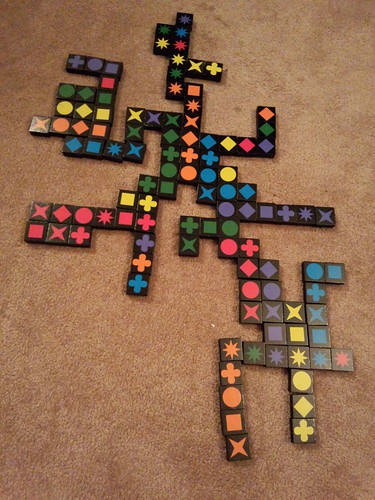
You seek to build as many Qwirkles as you can (worth 12 points each). A Qwirkle is a set of six tiles that share one thing in common (colour or shape). I loved it and set out to buy my own set.
That night, we also played Pandemic. I heard wonderful things about it at GeekMoot and really liked the idea that it's a co-operative game. Sadly, our team during games night wasn't able to save the world from the dreaded Black Disease, so I was itching to try it again and save the world.
Each player has a role, such as Dispatcher, Researcher and Quarantine Specialist. You work together to treat, cure and eradicate disease around the world, but you're constantly fighting epidemics.
We tried two other games that night too: Love Letter and Biblios. The former was all right but the latter is a game I'd like to try again.
A few weeks ago, I set out to buy Qwirkle and Pandemic. Unfortunately, Imaginary Wars didn't have either, but I picked up Labyrinth. It reminds me of the 2D adventure video games, in which you are trying to find hidden treasures. However, it's 3D and you must push a tile into the board to move the tiles around. Sometimes, you wind up in a dead end path and wish that the next player pushes you off the board so you can come in at hopefully a more favorable position.
Then, I went to the Sentry Box. Now, I knew they were big, but I never realized they were THAT big. It's the largest gaming store in all of North America, with over 13,000 square feet of tabletop gaming, models, comics, manga, books, plushies and play space.
I, er...um....bought enough to get the bulk discount:

So far, my family has tried Tsuro, which was featured on Wil Wheaton's show, Tabletop. The rules for this tile-based game are simple: 1 - Last dragon flying, wins. 2 - Follow the path. 3 - Don't crash into other dragons. It's fun to watch that particular episode:
Another new game that we've tried out is Edo. North Americans will say "EE-doh" but the Japanese student in me will pronounce it as it should be ("Eh-doh").
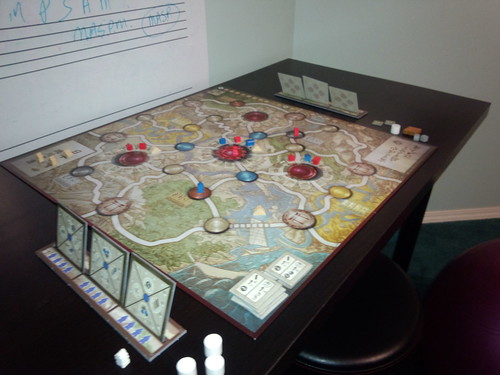
Although it took me a while to weed through the instructions (too much information to digest in one sitting), after a couple of rounds of gameplay, it's becoming one of my fave games. It's like Dominion in the sense that you are building a "kingdom" (er, "daimyo"). It's like Puerto Rico in the sense that you can build, harvest and earn money. Combine that with very well designed pieces - solid construction and aesthetically pleasing - and the Japanese theme and this chibi samuari is hooked.
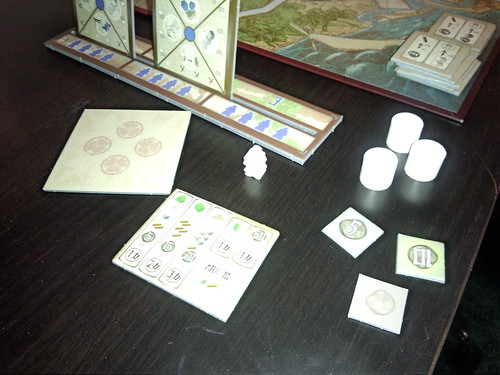
We will get to the other table games in those bags, but all in good time. I think we'll tackle the award-winning 7 Wonders next, as well as No Thanks.
If you're interested in checking out any of these games, drive past Toys'R'Us and head to a gaming store that specializes in European tabletop games, like Imaginary Wars and Sentry Box. Online, you can purchase Edo, Qwirkle, Tsuro and Pandemic on Amazon. One of my piano families recommend German Games.
Ready for FallCon 26?
Looking forward to my very first FallCon experience. Although I can't spend the entire weekend playing tabletop games, I'm just glad that I will be able to try out some new games. Online registration has closed, but you can still register for available sessions at the door. For more information, visit FallCon's website.
You can also check out the promo piece that appeared in FFWD earlier this week. FallCon was also featured on the Breakfast Show this morning.
My Music Ed App List for iOS Devices - 2013 edition
I've had my iPod Touch for two weeks now. Check out some of the music ed apps that I've loaded onto it, as well as some recommendations of iOS Apps from my colleagues Alessandra diCenzo and David Story.
Many of my students have mobile devices. It's what drove me to buying a Android smartphone and most recently, an iPod Touch. Now that I've had a bit of time to play with some of these apps that either my esteemed colleagues Alessandra diCenzo and David Story told me about or that I've stumbled upon, I can put a decent list together of music education apps for iPad, iPhone and iPod Touch.

Recording and Backing Track Apps for iOS
Garage Band for iPhone ($4.99) turns your iPad, iPhone and/or iPod touch into a collection of "touch instruments" and a full-featured recording studio. Want piano? Guitar? Drums? You can do it. You can even plug an electric guitar into you iThing to play through amps. Someone will have to let me know how well it works as I don't have an iPhone.
iReal b Music Book & Play Along ($7.99) is currently on my Android smartphone. However, I believe it was available for iOS devices first. What can I say about it? You get a mobile band with iReal b. Download the chord charts for over 1,200 songs available in the forums. Or, enter in the chord progression for any song, choose your instruments, tempo and style and play away. Instead of using a metronome, why not try practicing with a virtual band?
Note Reading, Theory and Ear Training Drills
Master in a Minute (FREE) is a fun music app for kids. It helps students develop their note reading skills. I like how it teaches intervallic reading. It has certainly been helping some of my students who are struggling with note reading. There used to be a full version, but it is no longer available in the App Store.
Music Reading Essentials ($2.99) has four sets of flash cards to choose from: notes, rhythms, intervals and symbols. Students can focus on one area or combine decks. The timer sure adds a bit of pressure. My students have been playing a round of this while waiting for their lesson.
Music Theory Pro ($4.99) has note naming games, key signatures and interval ear training. So far, I've noticed that it's better suited to my older beginners, intermediate and advanced students. Very slick design. I'll have to try the pro levels. I like how this app includes jazz chords and scales, altered dominants and extended chords. MTP is also available for Apple computers in the App store.
My Note Games! (FREE) was featured on BBC Click! and was nominated for a "Learning without Frontiers Innovation Award" in 2012. It has six games: Hear it, Play It; Play that Note, Play-a-Day!, Play-a-Carol!, Toonr the Tuner and Hear it, Note It. My beginner students enjoy it, although they don't get very far with the free version. I just bought the $6.99 upgrade to unlock all 18 levels..
Note Works Free (FREE) is for iPad. I was quite sad to see that I couldn't get it on my iPod Touch. It looked like pure fun when Alessandra showed it to a bunch of us at the 2013 CFMTA Convention. This game is designed to teach note recognition and improve sight reading skills. Your mission is to help Hungry Munchy catch each note as quickly as possible before it skitters off-screen. The full version has more bells and whistles (Note Works Full) for $4.99.
Rhythm Lab ($2.99) allows users to copy, save, or share any rhythm pattern as an image. You can send tapping results in an e-mail, create and print worksheets. My students and I haven't tried this app out yet
I have long recommended Musictheory.net to students and am glad that the creators have made a mobile version. Tenuto ($3.99) offers fifteen customizable exercises to help you with chord recogniation, intervals and ear training. There are also musical calculators and twelve-tone matrices. They also have a Theory Lesson app for $2.99.
Metronome and Tempo Related Apps
Metronome Ϟ (FREE) is what I have installed on my iPod Touch. It's simple and gets the job done. The "tap tempo" feature is greatly appreciated. Also, the practice timer is a neat. You can actually set it to hammer out the beats while you drill a trouble spot for one, two, three, four or five minutes.
I've just installed Tempo - Metronome with Setlists ($1.99). It has made the Top 100 List in the Music category. There are five modes: Basic, Preset, Setlist, Practice and Gig. Each mode presents a different combination of functionalities optimized for the task at hand. I look forward to exploring this app.
Tempo SloMo (FREE) allows you to practice at your own pace. This is great not just for music students, but language and dancing students as well. Take a whatever you are working on and slow it down or speed up the audio track without affecting the pitch. I think this will become a popular app with my students, especially with their pop songs.
There are countless apps for music education. I'll update the list as I discover new apps. Feel free to suggest some of your favourite iOS apps for learning and playing music.
Next, I'll take a look at some Android apps for music education.
Social Media Links
archives
- #YYCArts 32
- #YYCEvents 39
- Collaborative Music 25
- Community 11
- Composing & Arranging 6
- Entertainment 139
- Entrepreneurship 53
- Freebies 3
- Gardening 1
- Geeking Out 65
- Health & Wellness 120
- Improvisation 25
- Interviews 28
- Learning Music 188
- Martial Arts 13
- Memorization 7
- Music 230
- Music Careers 9
- Music Education 196
- Music Examinations 7
- Music Exploration 55
- Music Gigs 14
- Music Lessons 6
- Music Performance 32
- Music Theory 13
- Musical Instruments 12
- Musician Health 19
- Pets 57
- Piano Technique 12
- Practicing Music 120
- Productivity 20
- Professional Development 11
- Recommendations & Reviews 93
- Recreation 71
- Social Media 6
- Spirituality 10
- Studio Management 33
- Studio Technology 50
- Teaching Music 146
FOLLOW THE STUDIO on Instagram








Affiliate Links
As a Sheetmusicplus and CD Japan affiliate, I earn from qualifying purchases. The earnings help fund the Studio’s blog and YouTube channels. Your support is greatly appreciated.


FOLLOW Budo no Tabi on Instagram









