

THE MUSICAL MUSE
Blog dedicated to music education, practice tips, health
&
wellness, and geeking out.

Rhythm Games & Apps (2025 version
My latest list of rhythm games and apps for music students and teachers to explore.
Here is a list of rhythm games and apps that I recommended to my students a couple of years ago. Although I have not tried all of them, I do plan on featuring as many as I can on the Music Teacher Plays series:
Android Games & Apps
iOS Games & Apps

Trying out the Rhythm Cat app on my iPad.
Browser Games & Apps
Nintendo Switch
ROBLOX
Ro-Beats
Friday Nigh Bloxxin
Rhythm Master
Steam
Check out some of the past episodes of Music Teacher Plays, in which I test out music apps and games:
Do you have any favourite rhythm games or apps? Share them down in the comments below.

Getting the Hang of Hashtags
One of these days, I should update my document that contains most commonly used hashtags. Then, I can quickly copy and paste them into my weekly posts for my studio’s, as well as my martial arts club’s social media. Alas, that day is not today.
(Originally published in the Spring 2023 APTA News & Views)
One of these days, I should update my document that contains most commonly used hashtags. Then, I can quickly copy and paste them into my weekly posts for my studio’s, as well as my martial arts club’s social media. Alas, that day is not today.
For those who aren’t familiar with the term, “hashtags” are a tool that can improve your studio’s SEO (search engine optimization). Think of them as search terms by topics for social media. They generally look like this: “#_____”.
According to Twitter, the hashtag was created in 2007 by a web marketing specialist named Chris Messina.
Where to Use Hashtags
Hashtags can be used on most, if not all social media platforms, such as Facebook, Twitter, Instagram, YouTube, TikTok, Pinterest, and LinkedIn. There are countless other platforms that it’s hard to keep up with them all. Here are a few examples of where I use hashtags:

Why Use Hashtags
The reasons for using hashtags on your social media posts are similar to general marketing strategies, which can be easily broken down into making it easier for: people to find you, sharing information and engaging with others.
Hashtags can help you:
promote your business brand, projects, etc.
increase your business exposure
add context to your social media posts
expand your reach
engage with your followers/network
show support for social issues, local businesses, events, etc.
How to Use Hashtags
As you can see in this old Tweet (as well as my earlier examples), there is a general format to follow:

You make your post and then add hashtags at the end. Alternatively, you may add hashtags on keywords within your post. Don’t add spaces between words. Make everything a single word after the pound sign. Single words or short phrases that are commonly used work best.
The big caveat is to be mindful of your hashtags. They need to be relevant to what you are sharing. My dojo mates and I often grumble when we see posts completely unrelated to the martial arts we study because the poster decided to use #iaido. We click on it, hoping to learn a new training tip, only to see that it’s completely irrelevant. Trust me, it happens in all sorts of posts.
Keep in mind that “less is more” on some social media platforms. For instance, Facebook posts generally see better engagement with one to two hashtags versus the 11 - 30 that we commonly see in Instagram posts. LinkedIn recommends users to limit themselves to seven hashtags, while TikTok has no hashtag limit. Three to five hashtags seems to be the sweet spot on YouTube.
If you use a social media management platform such as Hootsuite or Buffer which allows you to crosspost to several platforms at once, I recommend you stick to the three to five hashtag sweetspot, or customize each post before hitting “Save.”
Finally, make sure your posts are set to “Public” so that your posts will show up in searches.
Popular Hashtags You Can Use
Here is a list of some commonly used music-related hashtags to jumpstart your hashtagging adventures:
#musiceducation #music #musiclessons #musicteacher #musician #musicianlife #musicschool #musiced #musiceducationmatters #musiceducator #musicteachersofinstagram #musicteachersofig #musicians #musictheory #musicclass #musicislife #classicalmusic #musicteachers #elementarymusic #musicbusiness #onlinemusiclessons #musicforkids #musicteacherlife #musiclessonsforadults #RCM #royalconservatoryofmusic #conservatorycanada
Hashtags can be instrument specific, for example: #ukulele, #violin, #guitar, #singinglessons, #fluteteacherlife, #pianoreels. You can also be location specific with your hashtags, for example: #yycpianolessons, #yqldrumlessons and #yegviolinlessons.
Finally, here are a few fun hashtags to expand the types of posts you can share: #MotivationMonday #MusicMonday #TuesdayTunes #TuesdayTip #WayBackWednesday #WisdomWednesday #ThrowbackThursday (or #TBT) #ThankfulThursday #FlashbackFriday #FridayFun #SmallBusinessSaturday #SimpleSaturday #SundayFunday #SpotlightSunday #keepgoing #keepupthegoodwork #AchievementUnlocked #levelup #practicemakesconsistent #practicepractice #funtimesatpiano
Do a quick search on these hashtags in the social media platform of your choice for more inspiration and ideas. Happy hashtagging!
For More Information:

Adventures with Cameras
(originally published in the Winter 2022 APTA News & Views)
I got schooled by one of my students earlier this year: “What cameras do you use for Practice Time and Trip Up the Teacher?” she asked.
“The Logitech camera overhead and my laptop camera, recording through StreamYard” I replied.
“Bruh, no. Laptop cameras suck. The video is so grainy. I can’t look at it. And don’t use StreamYard unless you’re livestreaming. Go old school. Do. It. The. Old. Fashioned. Way.”
(originally published in the Winter 2022 APTA News & Views)
I got schooled by one of my students earlier this year: “What cameras do you use for Practice Time and Trip Up the Teacher?” she asked.
“The Logitech camera overhead and my laptop camera, recording through StreamYard” I replied.
“Bruh, no. Laptop cameras suck. The video is so grainy. I can’t look at it. And don’t use StreamYard unless you’re livestreaming. Go old school. Do. It. The. Old. Fashioned. Way.”
Using Multiple Cameras for Teaching
Zoom and other web conferencing platforms make it extremely easy to connect multiple cameras and devices to the same meeting. If you have not yet experimented with using multiple cameras, plug them into your computer or connect via Bluetooth.
Next, head to the Video settings to find the list of cameras. From there, you can switch back and forth. If you use two devices when teaching online, you can display two camera views simultaneously.

Where to switch cameras in Zoom.
I currently use three cameras connected to my desktop computer when teaching online. My Logitech C-920 HD Pro Webcam hangs overhead the keys. It has a hole in the back to screw onto a camera tripod. I use a mic stand to camera adapter, which you can get from Amazon or Long & McQuade. This enables me to connect the webcam to a microphone stand with a boom arm.
I use its older sibling, the Logitech C-910 HD Pro Webcam as my front/side camera. Finally, I use its older cousin, the Logitech C-270 HD Webcam as my pedal cam. I toggle between cameras as needed to give my online students the best view.

My current online teaching setup.
The current model is the Logitech C-930. There are other brand names however, Logitech consistently dominates the “best webcam” lists with both old and new models. The C-900 Pro Webcam series remains a favourite among my fellow StreamYard users. Reasonably priced as well (all under $200).
Adventures in Video Recording
I recently completed my recording project of all the RCM technical requirements for the Studio’s YouTube channel. The videos chronicle my journey in content creation. Early videos were recorded with my phone. Then, I used my C-910 with the Logitech camera software. It worked all right for where I was at. Let’s just say the latter doesn’t handle fast passages or scales very well, especially when you plug in an external microphone.
Later videos were recorded via StreamYard, using either my C-910 or C-920 webcams. I sacrificed quality for convenience in StreamYard, as my current subscription only allows me to record in 720p. This did not impress my student (“too grainy”).
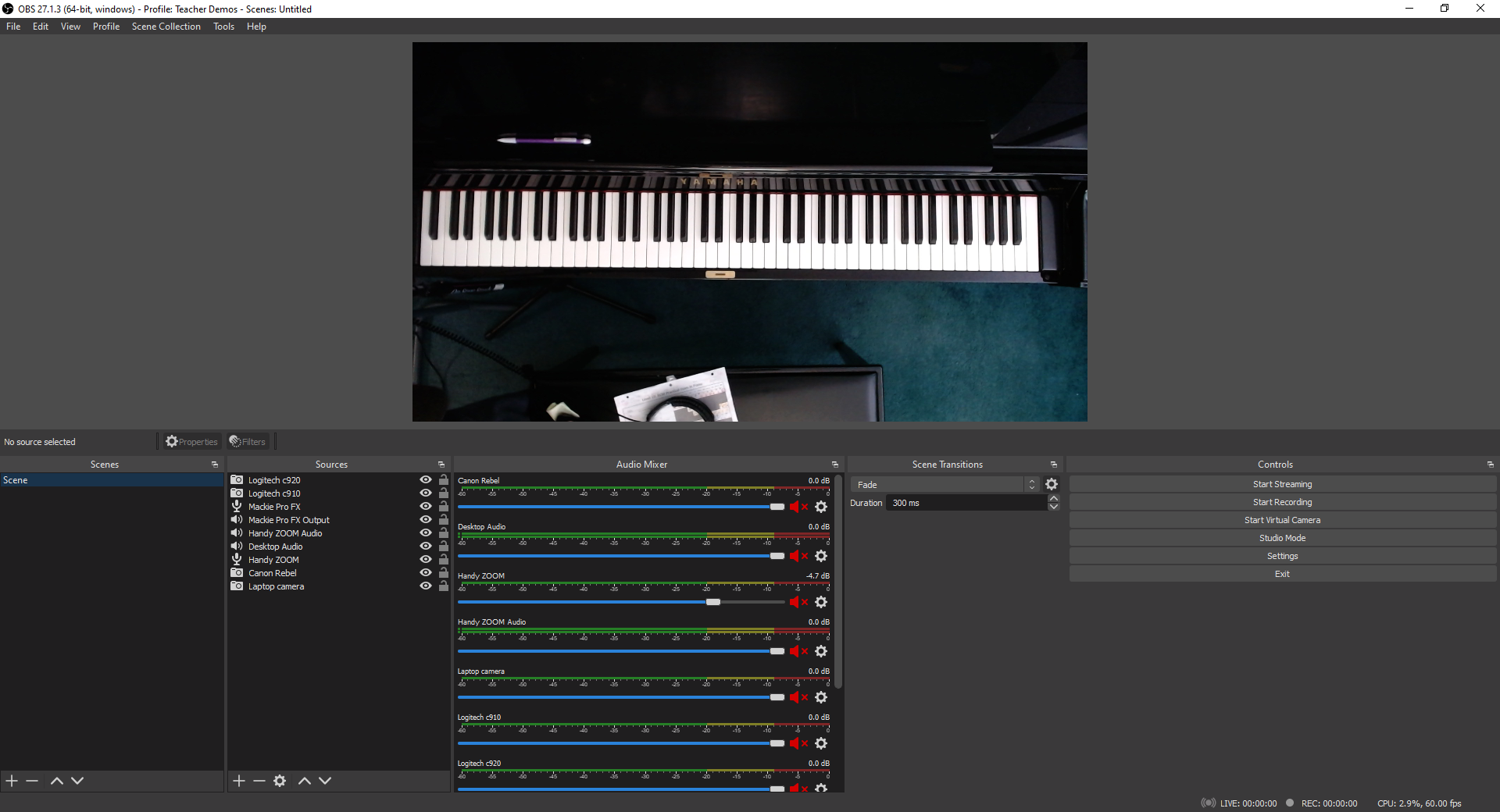
The Level 10 requirements video showcases the next level of my evolution: the Logitech C-920 Webcam and my new Lewitt LCT-140 AIR stereo pair “pencil” microphones plugged into my Mackie 6 channel mixer board. I recorded the videos using OBS Studio (Open Broadcaster Software), a popular program among content creators worldwide.
Back to my student. She declared that my Canon Rebel SLR camera should be my primary front/side camera for recording. Then, it was a tie between my HD Logitech webcams and my phone. Going back to “the old fashioned way” means to record with a good camera to the computer and then upload.
The big takeaway for webcams and video recording is this: don’t cheap out. Get the best camera you can afford. Get an HD 1080p camera or better. Many smartphones and tablets already fit that bill, just make sure to adjust your recording settings to HD. Unfortunately, most laptop cameras, as my student pointed out, “suck.”
My C-270 and C-910 are dinosaurs now, but they’re still going strong. On the other hand, my old Microsoft LifeCam, which I purchased around the same time as the C-270 has been collecting dust in a “To Discard/Recycle” pile.
Let’s Talk About Lighting
While reviewing the raw files for the Level 10 requirements, I noticed that the keys were less distinct, almost distorted at the bottom register. As you can see in this screenshot, the keys are also indistinct in the high register.

Distinctly indistinct.
I did some experimenting during lessons and discovered that the culprit is my ceiling light. Afterwards, I played around with my ring light and my softbox light. The winning setup for this recording configuration was the softbox light.
All clear now
For livestreaming, I have learned that both the softbox light and ring light are my allies. Here’s a screenshot from a supplemental video I recorded for some of my students. It’s hard to believe that I recorded this at 11 PM. The lighting is pretty bright without making me look washed out.

Recording Day
The first takeaway is that if you’re doing any video recording, you need to have good lighting. It’s much easier to record a video performance or tutorial with good lighting than trying to adjust the lighting in an editing program. Believe me, I first tried the editing route with the Level 10 files but quickly realized that it would be quicker to just re-record.
The second point is this: don’t cheap out on the lighting either. Get the best lighting you can afford. I bought a $39 ring light from Amazon early on in the pandemic. It was so flimsy that it broke after one fall onto carpet. I’m extremely happy with my $60 Ergopixel ring light. The construction is solid, from the tripod to the phone clamp. I can also switch from warm to cool lighting and adjust the intensity.
I recently received a softbox light as a gift. I think I’ll buy a softbox lighting set so I can control the light from different angles.
It’s been fun playing around with my new setup. I still have to do some troubleshooting with my Canon Rebel and figure out how I want to use my new green screen. I’m sure my students will have a few ideas on the latter.

Improving Your Audio Quality in your Teaching Studio
Shortly after our October online piano party, one student asked, “Bruh, how come you sounded so clear when the rest of us sounded just okay?”
To which, I replied: “It’s because I didn’t use the device mic.”
“You should write about that. How to improve your sound.”
(Originally published in APTA News & Views)
Shortly after our October online piano party, one student asked, “Bruh, how come you sounded so clear when the rest of us sounded just okay?”
To which, I replied: “It’s because I didn’t use the device mic.”
“You should write about that. How to improve your sound.”
So here I am.
Simple Sound Hacks
Many students and teachers use phones and tablets for online lessons and recording. Technology has come a long way, but I’m sure you have noticed that Zoom and some of the other video conferencing platforms fail to capture the subtle nuances in upper intermediate and advanced repertoire. Choosing “Enable Original Sound” and “High-fidelity Music Mode” only goes so far.
One simple microphone hack you can experiment with is the microphone’s distance from the piano. I’m no physicist or sound engineer, but I have worked enough symphony and jazz concerts at Arts Commons to take note of where the audience and microphones are positioned in relation to the stage. I have used that as my starting point to experiment with.
If you or your student are hearing a lot of sound distortion, chances are, the microphones are too close to the instrument. My students and I have learned that depending upon the piece, the sweet spot for the microphone in a phone, tablet or laptop is anywhere between two to four feet away from the piano and approximately at someone’s ear height when sitting.
The louder the piece, the farther the microphone needs to be. Alternatively, I adjust my students’ microphone volume when we’re livestreaming.

The louder the piece, the farther away the laptop is.
Using earbuds or headphones will help reduce audio echoes when in Zoom, StreamYard, Discord or any online platform. You may need to get a stereo audio extension cable now that your device is farther away. They retail for less than $10.
If a student insists on positioning their device at the edge of the keyboard, you are going to hear a significant amount of sound distortion. One easy hack is to have them place an eraser or something rubbery like a hockey puck beneath their phone or tablet. One of my university professors placed her upright piano on four hockey pucks to dampen the sound transfer from her townhouse unit to her neighbour’s unit below. It worked extremely well.
If there are lot of hard surfaces in your studio or your students’ practice areas, you can experiment with sound baffling to help minimize reverberation. Although there are sound baffle panels and blankets out there, you can easily achieve results by adding more soft materials to the room, such as pillows, blankets and towels, which will absorb the sound.
Levelling Up Your Sound
One thing I learned from livestreaming and producing content for my YouTube Channels is that if you really want better sound, you need to invest in better microphones designed for high-fidelity sound.
I started by using my Zoom H2N surround sound recorder (approx. $230) as a USB microphone, connected to my computer. It has five built-in microphones and four recording modes. You can get recording studio quality with it. There are several newer models that come with many bells and whistles. Perhaps too many, so do check the specifications to see what best fits your needs and your computer’s specifications.
There are five microphones that consistently pop up in “best microphones for music podcasting” searches that are worth checking out. They are the Blue Yeti ($125 and up), the Rode NT USB ($219), the Rode Procaster ($300 and up), the Audio-Technica AT2020USB+ ($219 and up), and Shure MV7 ($229 and up).
The second thing I learned is that if you are doing any piano combo work, be it piano and voice or piano and guitar, each instrument needs its own dedicated microphone. Otherwise, the piano will just drown out everyone else.
The only exception is when I fiddle with the microphone settings. When I teach online, I sometimes use my Razer Blackhawk Gaming Headset (approximately $100). The microphone is on the headset, so my voice is louder than the piano. When using the H2N unit, I adjust the recording mode to 90 degrees X/Y stereo and zero gain (no signal amplification) and position the microphone in front of me (and then just plug in earbuds into my stereo. These adjustments allow the microphone to catch more of my voice than the piano.
If you decide to take the plunge and buy one of these microphones, hop onto YouTube to get more tips and tricks. Check out Bea Chu, Todd Audio, and Christian Henson Music on YouTube.
Earlier this year, I invested in a stereo pair of Lewitt LCT 140 Air:

I was planning on doing an unboxing and review video. This screenshot is from the unboxing. I pretty much started using them as soon as I plugged them in. Hopefully, I’ll get around to completing the unboxing/review, but in the meantime, you can hear what they sound like in these two videos:
Recorded with Sound set to Flat, Filter OFF and Pad set to O. No additional sound FX.
Recorded with same microphone settings, with the addition of Small Stage FX setting on the Mackie.
These days, I use my Shure PG4 Wireless Headset System, AT4040 Condenser Microphone and Sennheiser HD 280 Pro Headphones plugged into a Mackie ProFXv3 Mixer Board for content creation and livestreaming. When recording piano only, then I break out the Lewitts That way, I can really adjust the sound for multiple instruments and add sound effects to make it sound like I’m inside a concert hall or recording studio.

Adventures in Live Streaming & Streaming
I think it was around 9:00 PM that Saturday night when I concluded that if I was feeling depressed about the music ministry not being able to contribute to Holy Week services, the rest of the choir probably felt the same. Perhaps they would like to sing along with me while I practiced?
That led to a quick search on live streaming options.
My foray into live streaming and streaming began on Palm Sunday weekend, my designated weekend to play at church. All in-person church services were cancelled at the point due to the COVID-19 pandemic.
Holy Week is huge for Catholics, so I am sure I wasn’t alone in feeling gutted and a little lost that this most vital celebration of our faith and Jesus’ sacrifice was relegated to worshipping alone in isolation, together yet apart, rather than celebrating together as a faith community at church. So, I kept practicing because I needed to do something that felt normal for that time of year. A small part of me practiced in the off-chance that we’d get the green light to have music at our Easter Sunday Mass that was live streamed (we did and it was glorious).
Jumping into Live Streaming
I think it was around 9:00 PM that Saturday night when I concluded that if I was feeling depressed about the music ministry not being able to contribute to Holy Week services, the rest of the choir probably felt the same. Perhaps they would like to sing along with me while I practiced?
That led to a quick search on live streaming options. I must admit, I didn’t know much about live streaming or streaming, other than the fact that sometimes my gamer friends and favourite YouTubers did live streams (live broadcasts online). Sometimes, they upload prepared content (streaming).
OBS popped up at the top of my search. Impressive, but the learning curve seemed too high for my mental state that weekend. Having made the decision, I just wanted to start streaming right away. I considered Facebook Live and Instagram Live briefly. A small part of my mind was already thinking ahead to multi-streaming - broadcasting to multiple places, like Facebook and YouTube simultaneously. So, Facebook Live and Instagram Live were ruled out immediately.
That’s when I found StreamYard. It’s a web-based livestreaming service, which allows you to stream to YouTube, LinkedIn, Twitch, Facebook, Periscope and Custom RMTP. Upon a quick skim, StreamYard seemed to have the lowest learning curve so I plunged in. A few quick sound tests and within 10 minutes, I was live streaming a practice session - and people listened and interacted throughout.
Music Ministry Hour
I was soon joined by my friends and fellow liturgical musicians Lisa Kiernan (St. Gabriel the Archangel) and Kay Alexander (St. Mark’s). Our impromptu live streams morphed into a weekly worship sing-a-long throughout the Easter season. Sometimes, we were joined by my brother Jay (St. Francis de Sales) and the Wourms family from St. Gabriel’s. We all studied the Scripture readings for the upcoming week and selected songs that we would typically do if we celebrated Mass. We multi-streamed - live - to Facebook and YouTube (A.K.A. “simulcasting”).

Sound check in StreamYard’s virtual Broadcast Studio.
Each week, we learned a little bit more about audio levels, equipment, and mic positioning. One weekend, I played around with custom overlays in Figma and banners in StreamYard, so things looked pretty darn slick by the last session:

Designing video thumbnails and overlays in Figma has been a lot of fun.
Live Streaming Recitals
After Spring Break, my students and I discussed options for the June 2020 recital: to live stream or pre-record. I was already experimenting with live streaming. My students, being the tech savvy folks they are, knew just as well as I that editing videos usually takes longer than you think it will. Perhaps that’s why even they were curious about live streaming a recital.
We needed to do a test. I contacted our local nursing home to see if they’d like us to perform for the residents in a virtual recital. Six students signed up to be guinea pigs. Here’s a clip of my live stream preparations for the recital:
The residents watched the live stream or the replay. We also invited family and friends to watch the recital as an unlisted YouTube live broadcast. It went well. Afterwards, my students said that it felt similar to a normal recital. The excitement level was the same. Everyone liked the idea that we could chat backstage, while parents were pleased with the sound quality and overall experience.
We decided to move forward with a live stream recital in June. My students took full advantage of the backstage chat window during the recital, cheering each other on. Family and friends utilized the live chat on YouTube. Thanks to StreamYard’s user interface, I inserted some of the comments directly into the live stream and responded to comments and questions in real time.
I don’t think anyone noticed that I accidentally left the broadcast. Thankfully, with StreamYard doing all the heavy lifting, the show went on. I quickly slipped back in before the next performer needed to take the stage.
It wasn’t the same as being in a church and having the Snack & Chat afterwards, but at least there was that real-time interaction with family and friends both near and far.
Live Streaming 101 Webinars
In May, both the Alberta Registered Music Teachers’ Association and Alberta Piano Teachers’ Association asked me to do a webinar on Live Streaming and Streaming Recitals and other studio events. From the sounds of it, it was well received and convinced a handful of teachers to give live streaming or streaming a shot.
The webinar and reference materials are currently only available to APTA and ARMTA members. I am in the process of re-jigging the material into an online course that will be available for purchase on the Studio website next month.
Live Streaming & Streaming - The Adventure Continues
Throughout the spring and summer, I played around with streaming and live streaming. The bulk of my content creation so far has been teacher demos of student repertoire and RCM and Conservatory Canada technical requirements, which are available on the Studio’s YouTube Channel. I record in StreamYard to toggle between multiple camera angles while recording and use Davinci Resolve to edit the videos.

What “So…um…” looks like.
In the fall, my impromptu Practice Clips & Tips Instagram and Facebook series levelled up to the Practice Time with Ms. Rhona weekly series on YouTube:
I picked up a new toy to improve my audio quality. I’m still playing around with both the mixer board and the microphones to find the ideal setup. It’s a work in progress:
Check out my studio tech setup here.
I also decided to commit more time to creste content for my two other channels. There’s The Musical Muse - my musician/freelance writer channel, where I upload performances, unboxing videos and reviews, as well as Budo No Tabi - my budo & Japanese culture related channel, uploading sword care tutorials, unboxing, and fun videos of my exploration of Japanese culture. I have a few more content ideas but that’ll be a surprise.
This is not easy by any stretch of the means. The biggest challenges for me right now are balancing my workload, prioritizing tasks better, and managing my time and energy. It has been a fun adventure, learning how to use Davinci Resolve and exploring different setups, content ideas, and so on.
My students and I held the first piano party of the year in StreamYard and Steam. We used the “Record Only” option in StreamYard for the performances. We kept the Broadcast Room open while we played Skribbl.io and Among Us. Naturally, we muted our mics and turned off our cameras while playing Among Us so as to not give away who was a Crewmate and who was an Impostor.
Afterwards, I shared the video with studio family and friends as an unlisted video. However, I can share these highlights with you:
Next month, we will be performing our annual Christmas recital for the nursing home residents online. It will be live streamed privately to the residents as well as to studio family and friends. My returning students are pros at setting up their mics and cameras now, so I don’t think the sound check period prior to the recital will need to be as long as it was in June. I think Sound Check began one or 1.5 hours before we went live. The newbies will just need a little bit of coaching, but thankfully, most of them attended the piano party, so they got a little taste of what’s to come.
***
Fellow teachers, with stricter gathering restrictions in place once again, what are you doing this year for recitals?
DISCLAIMER: This post contains a referral link to StreamYard. If you get a Basic or Pro subscription, you will get a discount and I’ll get a little referral bonus.
Social Media Links
archives
- #YYCArts 32
- #YYCEvents 39
- Collaborative Music 25
- Community 11
- Composing & Arranging 6
- Entertainment 139
- Entrepreneurship 53
- Freebies 3
- Gardening 1
- Geeking Out 65
- Health & Wellness 120
- Improvisation 25
- Interviews 28
- Learning Music 188
- Martial Arts 13
- Memorization 7
- Music 230
- Music Careers 9
- Music Education 196
- Music Examinations 7
- Music Exploration 55
- Music Gigs 14
- Music Lessons 6
- Music Performance 32
- Music Theory 13
- Musical Instruments 12
- Musician Health 19
- Pets 57
- Piano Technique 12
- Practicing Music 120
- Productivity 20
- Professional Development 11
- Recommendations & Reviews 93
- Recreation 71
- Social Media 6
- Spirituality 10
- Studio Management 33
- Studio Technology 50
- Teaching Music 146
FOLLOW THE STUDIO on Instagram








Affiliate Links
As a Sheetmusicplus and CD Japan affiliate, I earn from qualifying purchases. The earnings help fund the Studio’s blog and YouTube channels. Your support is greatly appreciated.


FOLLOW Budo no Tabi on Instagram









