

THE MUSICAL MUSE
Blog dedicated to music education, practice tips, health
&
wellness, and geeking out.

Improving Your Audio Quality in your Teaching Studio
Shortly after our October online piano party, one student asked, “Bruh, how come you sounded so clear when the rest of us sounded just okay?”
To which, I replied: “It’s because I didn’t use the device mic.”
“You should write about that. How to improve your sound.”
(Originally published in APTA News & Views)
Shortly after our October online piano party, one student asked, “Bruh, how come you sounded so clear when the rest of us sounded just okay?”
To which, I replied: “It’s because I didn’t use the device mic.”
“You should write about that. How to improve your sound.”
So here I am.
Simple Sound Hacks
Many students and teachers use phones and tablets for online lessons and recording. Technology has come a long way, but I’m sure you have noticed that Zoom and some of the other video conferencing platforms fail to capture the subtle nuances in upper intermediate and advanced repertoire. Choosing “Enable Original Sound” and “High-fidelity Music Mode” only goes so far.
One simple microphone hack you can experiment with is the microphone’s distance from the piano. I’m no physicist or sound engineer, but I have worked enough symphony and jazz concerts at Arts Commons to take note of where the audience and microphones are positioned in relation to the stage. I have used that as my starting point to experiment with.
If you or your student are hearing a lot of sound distortion, chances are, the microphones are too close to the instrument. My students and I have learned that depending upon the piece, the sweet spot for the microphone in a phone, tablet or laptop is anywhere between two to four feet away from the piano and approximately at someone’s ear height when sitting.
The louder the piece, the farther the microphone needs to be. Alternatively, I adjust my students’ microphone volume when we’re livestreaming.

The louder the piece, the farther away the laptop is.
Using earbuds or headphones will help reduce audio echoes when in Zoom, StreamYard, Discord or any online platform. You may need to get a stereo audio extension cable now that your device is farther away. They retail for less than $10.
If a student insists on positioning their device at the edge of the keyboard, you are going to hear a significant amount of sound distortion. One easy hack is to have them place an eraser or something rubbery like a hockey puck beneath their phone or tablet. One of my university professors placed her upright piano on four hockey pucks to dampen the sound transfer from her townhouse unit to her neighbour’s unit below. It worked extremely well.
If there are lot of hard surfaces in your studio or your students’ practice areas, you can experiment with sound baffling to help minimize reverberation. Although there are sound baffle panels and blankets out there, you can easily achieve results by adding more soft materials to the room, such as pillows, blankets and towels, which will absorb the sound.
Levelling Up Your Sound
One thing I learned from livestreaming and producing content for my YouTube Channels is that if you really want better sound, you need to invest in better microphones designed for high-fidelity sound.
I started by using my Zoom H2N surround sound recorder (approx. $230) as a USB microphone, connected to my computer. It has five built-in microphones and four recording modes. You can get recording studio quality with it. There are several newer models that come with many bells and whistles. Perhaps too many, so do check the specifications to see what best fits your needs and your computer’s specifications.
There are five microphones that consistently pop up in “best microphones for music podcasting” searches that are worth checking out. They are the Blue Yeti ($125 and up), the Rode NT USB ($219), the Rode Procaster ($300 and up), the Audio-Technica AT2020USB+ ($219 and up), and Shure MV7 ($229 and up).
The second thing I learned is that if you are doing any piano combo work, be it piano and voice or piano and guitar, each instrument needs its own dedicated microphone. Otherwise, the piano will just drown out everyone else.
The only exception is when I fiddle with the microphone settings. When I teach online, I sometimes use my Razer Blackhawk Gaming Headset (approximately $100). The microphone is on the headset, so my voice is louder than the piano. When using the H2N unit, I adjust the recording mode to 90 degrees X/Y stereo and zero gain (no signal amplification) and position the microphone in front of me (and then just plug in earbuds into my stereo. These adjustments allow the microphone to catch more of my voice than the piano.
If you decide to take the plunge and buy one of these microphones, hop onto YouTube to get more tips and tricks. Check out Bea Chu, Todd Audio, and Christian Henson Music on YouTube.
Earlier this year, I invested in a stereo pair of Lewitt LCT 140 Air:
I was planning on doing an unboxing and review video. This screenshot is from the unboxing. I pretty much started using them as soon as I plugged them in. Hopefully, I’ll get around to completing the unboxing/review, but in the meantime, you can hear what they sound like in these two videos:
Recorded with Sound set to Flat, Filter OFF and Pad set to O. No additional sound FX.
Recorded with same microphone settings, with the addition of Small Stage FX setting on the Mackie.
These days, I use my Shure PG4 Wireless Headset System, AT4040 Condenser Microphone and Sennheiser HD 280 Pro Headphones plugged into a Mackie ProFXv3 Mixer Board for content creation and livestreaming. When recording piano only, then I break out the Lewitts That way, I can really adjust the sound for multiple instruments and add sound effects to make it sound like I’m inside a concert hall or recording studio.
A First Look at the Happy Planner - Teacher Edition
If you’ve been following my blog for a while, you know that I’m a bit of a planner geek. Last year, I used the Private Music Teacher Planner & Agenda by Full Voice. You can find out my first impressions of it here:
It is a wonderful planner. Very well thought out.
It’s just that since a good chunk of my operations is managed online via My Music Staff (affiliate link) and my main bullet journal/planner, it was too much planner for what I need. I probably used only half of the layouts.
This year, I am trying the Teacher Edition of The Happy Planner. What attracted me to it is its simplicity and flexibility. I give my first impressions and take you on a flip through in today’s video:
Fellow teachers, what is your favourite planner for lessons? Analog or digital? Pre-made or custom-made? Share them in the Comments below.

Student Article Review: Liveabout's Beginner's Guide to Music History
My student M is back with another review:
The website is called A Beginner’s Guide to Music History, written by Espie Estrella. She is a lyricist, songwriter, and member of the Nashville Songwriters Association International.
My student M is back with another review:
Student Review of A Beginner’s Guide to Music History
The website is called A Beginner’s Guide to Music History, written by Espie Estrella. She is a lyricist, songwriter, and member of the Nashville Songwriters Association International.
The article included a paragraph of The origin of history and music and the different music time periods. I liked how simple it was to read and how easy it was to understand, even though there were a couple of advanced terms.
I also liked how they didn't use 3-4 paragraphs to explain the time periods. There wasn't anything I specifically did not like, just some improvements I think should be made, like adding a bit more information.
It was pretty easy to navigate and find what you wanted because the article is pretty short and it was arranged where the older periods are at the top and modern ones at the bottom. Another website I came across also used time periods, and they were in the same order. I would rate it a 5/5 for how easy it was to read, but a 4.5/5 overall.
Teacher’s First Impressions of A Beginner’s Guide to Music History
The article does give a good general overview of music history. There are just a couple of points that stuck out, that I should address.
Regarding the Baroque era, that is actually my first time reading that translation for “barocco". In music history class, we were taught that it meant “rough pearl.” Also, the modern double bass did not exist in the Baroque Period. Its predecessors, the violione and viol da gamba did.
It would have been beneficial for music students for hotlinks to be added for some of the terms, such as “cantus firmus”, “Ondes-Martnot” “monophonic” and “serialism”.
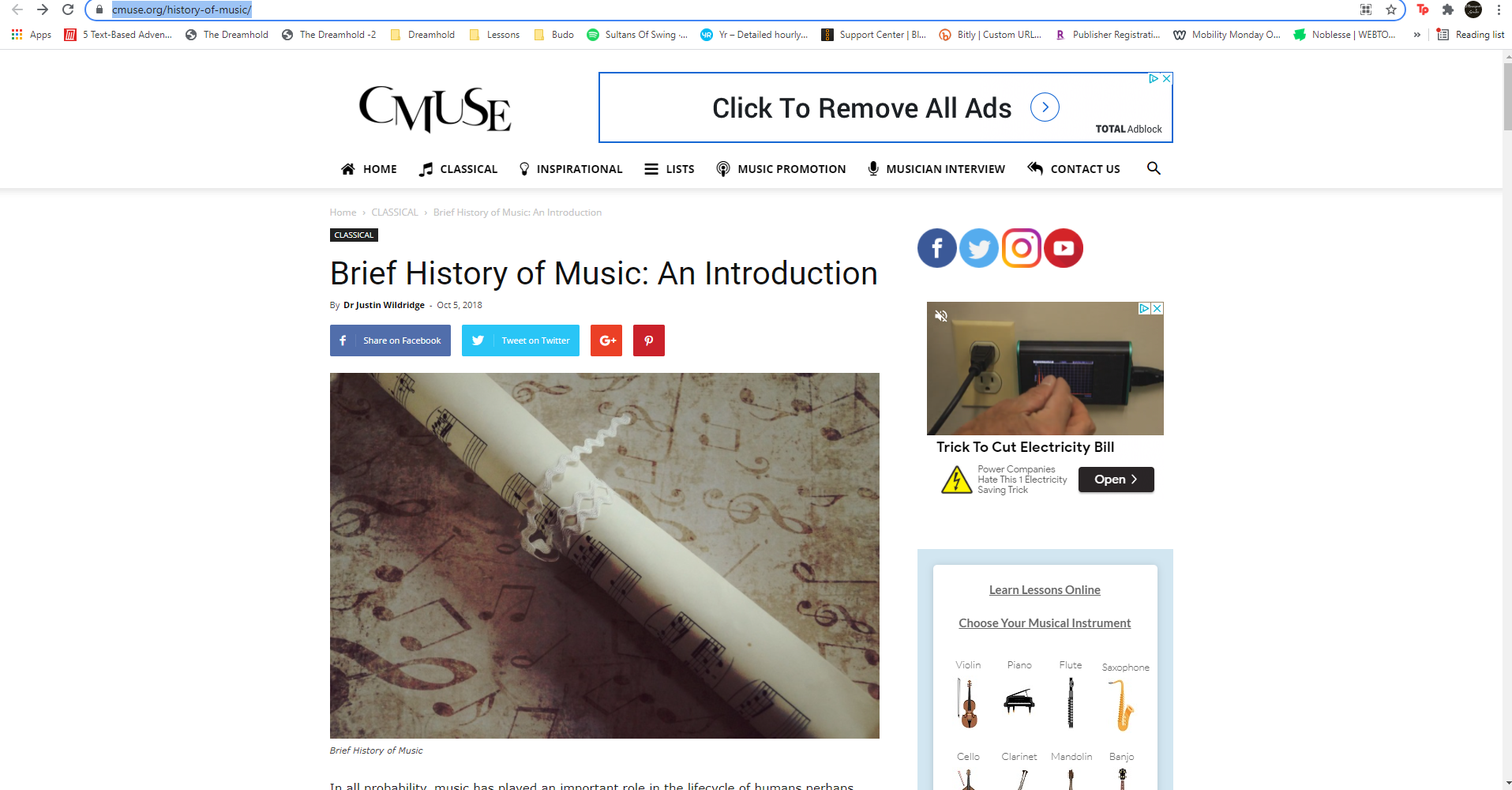
Student Website Review: CMUSE
My student M is back again with a website review of CMUSE’s History of Website page:
CMUSE: Brief History of Music Student Review
The name of the website is called Brief History of Music: An Introduction. The website is It is written by Dr. Justin Wildridge. He is a media composer and multi-instrumentalist based in the South-West of England where he works from his own studio.
My student M is back again with a website review of CMUSE’s History of Website page:
CMUSE: Brief History of Music Student Review
The name of the website is called Brief History of Music: An Introduction. The website is It is written by Dr. Justin Wildridge. He is a media composer and multi-instrumentalist based in the South-West of England where he works from his own studio.
The article includes some of how music started, the history of music, and a very descriptive introduction to all the important music time periods.
I liked how much information is included, and how it included a lot of information in a very short amount of words. It is a pretty great introduction to all the time periods and the basics of music history.
I didn't really like some of the words included in the article, because they are pretty complicated, and I needed to search them up.
I'd say that it is pretty easy to navigate in the article unless you only want to learn about a specific time period. It was organized in order from the older times periods to more modern time periods, so it makes sense. This one would be one of the pretty descriptive and informative types based on the websites I looked at, and it included everything other websites had and even more. I would rate it a solid 4.9 out of 5 because it did a great job of informing me, it's just that some of the language was confusing.
About CMUSE
CMUSE is a music and entertainment website which includes articles written by various industry contributors. The articles fall under the following categories:
Classical
Jazz
Rock & Pop
Music Tech
Lists & Quizzes
Inspirational
Music Promotions
Musician Interviews
Feature articles
They cover a diverse range of music-related topics and makes for fun an educational exploration.
Please note that CMUSE is a participant of the Amazon Associates Program, meaning that they share affiliate links on their site.

Adventures in Migraine Prophylaxis
It was really just this year that we started looking at my headaches as migraines. One glance at the Timeline of a Migraine Attack (Source: American Migraine Foundation) confirmed that I have been suffering from something beyond a mere sinus headache:
I think it was around 2018* that I started to suffer from migraines, or at least, they started to become an issue. Although at the time, I complained to my doctor about “really bad weather-related sinus headaches.”
Since the headaches start when the barometric pressure rises, my doctor didn’t jump right away to call it a migraine. Since hypertension runs in my family, I was diagnosed with that and started taking blood pressure medication.
Fast forward to 2019. My GP wasn’t available so I wound up with another doctor at the clinic. I complained that the weather-related headaches were getting worse and he recommended that I start keeping a headache log. He was my attending doctor for the next few visits, so I gave him updates while he gave me suggestions. He urged me to continue logging my triggers and remedies.
It was really just this year that we started looking at my headaches as migraines. One glance at the Timeline of a Migraine Attack (Source: American Migraine Foundation) confirmed that I have been suffering from something beyond a mere sinus headache:

Source: American Migraine Foundation
I do have my own nicknames for my most common symptoms, such as “Thinking is Hard,” “Words Hard", “Icepick Head,” “Super Senses,” “Sinus Head,” “Foggy Brain,” “Super Slow Mode,” etc.
Here is a good talk about migraines featuring Dr. Michael Teixido, a neurotologist from Delaware and Vice President of the Association of Migraine Disorders. He describes how the brain and body react to a migraine trigger, understanding your pattern, and learning to manage your triggers:
March was my breakthrough month. I started to chart my symptoms in relation to the barometric pressure changes:
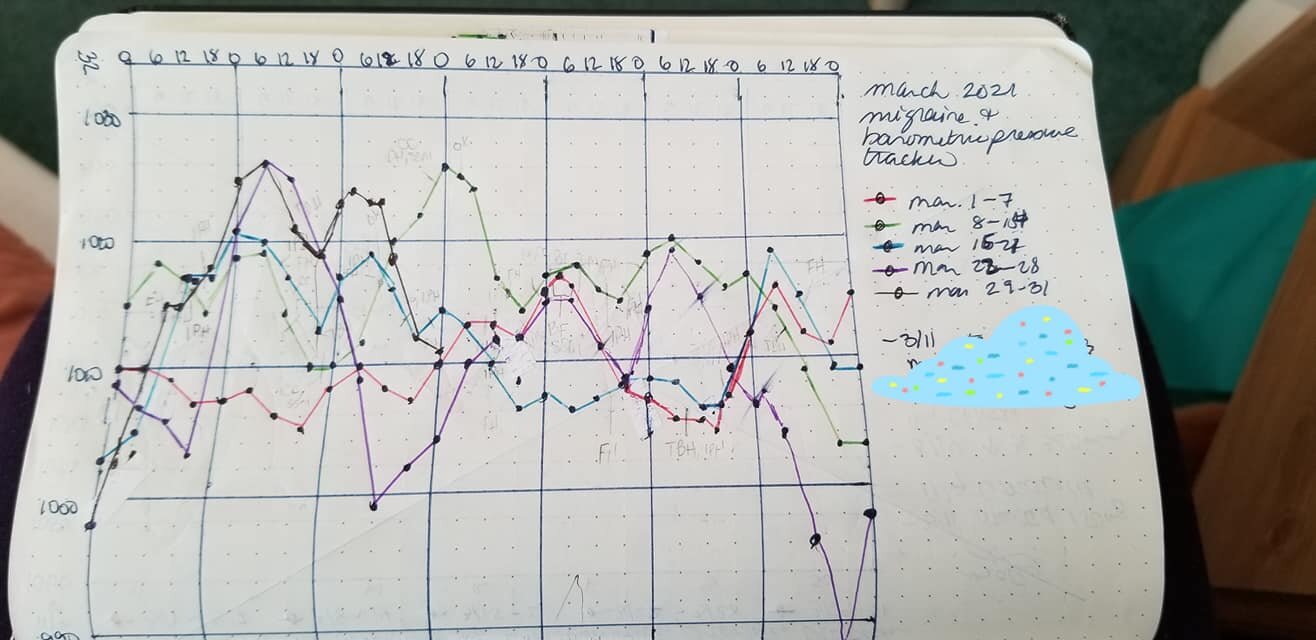
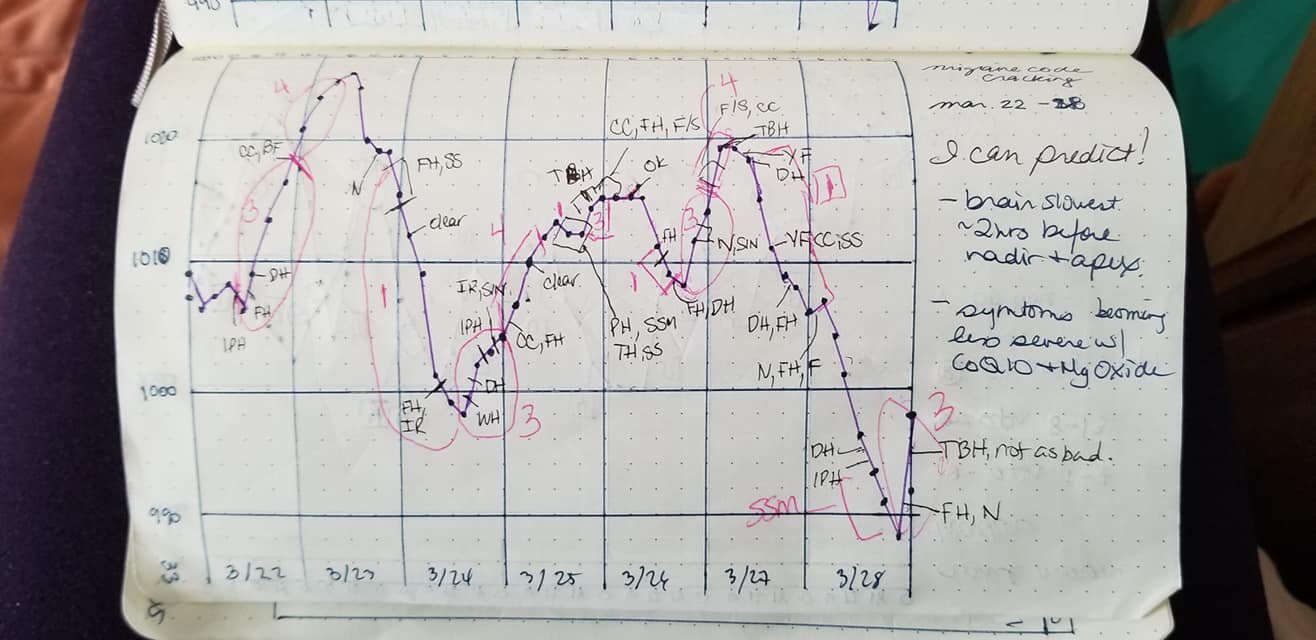
I learned that I’m in Group 1 - those who suffer before the weather changes (e.g. chinook, thunderstorm). Most people I know belong to Group 2 - those who suffer when the change hits (Source: CBC: Migraines and asthma flare-ups may be due to weather changes, says doctor).
But knowing the pattern wasn’t enough. I wanted to be able to predict when I might have a migraine so that I could schedule my heavy thinking tasks when I wasn’t in the middle of “Completely Useless Mode.” I vlogged about working with the barometric pressure forecast:
Around this time, I stumbled upon migraine hats. I wound up buying three different kinds: the Icekap, Tolaccea Migraine & Headache Hat and FOMI Gel Ice Hat. Check out my unboxing and review videos below:
They all provide cold therapy and compression therapy - two things migraineurs crave during the neurological roller coaster of pain and weirdness known as a migraine.
Thanks to understanding my pattern and the weather forecast, with planning I can usually get through migraine attacks armed with my migraine hats, and mitigating my symptoms and triggers within my control. I can generally predict when I might need a Migraine Nap and/or Tylenol.
But still, that wasn’t enough. I wanted to learn how to decrease the severity and frequency of my migraine attacks. However, I wanted to do this without taking prescription medication, botox, e-TNS or surgery.
Enter my “gauntlet of migraine management” - vitamins and supplements. Migraineurs tend to be low on Riboflavin (Vitamin B2), Magnesium, CoQ10, Vitamin D, and Melatonin. Click here for the recommended dosages.
I added the vitamins one at a time, so I can share how each improved my situation:
Vitamin D: Increasing my dosage through vitamins and sunshine just meant that my immune system got a huge boost.
Magnesium: Decreased the severity of the headache symptoms within one to two weeks of adding it.
Melatonin: Better sleep.
CoQ10: Decreased the severity of the “brain fog” symptoms.
Vitamin B2: Decreased the frequency and severity to the point I am barely affected by the weather changes when my fellow Group 1 friends are riding the roller coaster of pain.
Although there are migraine multivitamins out on the market, I prefer to take the vitamins individually. That way, if I eat more foods rich in Magnesium and Melatonin, I don’t need to take as much in pill form that day. Don’t bother trying to eat the required CoQ10 intake for migraineurs It’s just not feasible to eat 51 pounds of salmon a day.
It’s a work in progress. I have since discovered I have additional migraine triggers, which are manageable if I am vigilant. Although I’m doing much better these days, I still need to make sure I don’t overwhelm my sensitive little brain by letting the triggers pile up. Been there, done that. Don’t care to repeat.
If you would like to learn more about how barometric pressure affects your health or about managing your migraines, check out these links:
Migraine Canada (check out the “Resources” page)
Do you suffer from migraines or other weather-related chronic conditions? Share any tips, tricks or comments below.
*December 8, 2021 note: It must have been longer than 2018 as I recall that Maestro would guard me whenever I was lying down on the floor with a severe bout, and he passed away in 2016.
Social Media Links
archives
- #YYCArts 32
- #YYCEvents 39
- Collaborative Music 25
- Community 11
- Composing & Arranging 6
- Entertainment 139
- Entrepreneurship 53
- Freebies 3
- Gardening 1
- Geeking Out 65
- Health & Wellness 120
- Improvisation 25
- Interviews 28
- Learning Music 188
- Martial Arts 13
- Memorization 7
- Music 230
- Music Careers 9
- Music Education 196
- Music Examinations 7
- Music Exploration 55
- Music Gigs 14
- Music Lessons 6
- Music Performance 32
- Music Theory 13
- Musical Instruments 12
- Musician Health 19
- Pets 57
- Piano Technique 12
- Practicing Music 120
- Productivity 20
- Professional Development 11
- Recommendations & Reviews 93
- Recreation 71
- Social Media 6
- Spirituality 10
- Studio Management 33
- Studio Technology 50
- Teaching Music 146
FOLLOW THE STUDIO on Instagram








Affiliate Links
As a Sheetmusicplus and CD Japan affiliate, I earn from qualifying purchases. The earnings help fund the Studio’s blog and YouTube channels. Your support is greatly appreciated.


FOLLOW Budo no Tabi on Instagram









