

THE MUSICAL MUSE
Blog dedicated to music education, practice tips, health
&
wellness, and geeking out.
Metronome Android Apps
I recently moved into the 21st century as far as cellphone technology. Yes, you're right. I finally got onto the smartphone wagon.
I've been experimenting with a couple of free metronome apps for Android to help when I'm practicing music away from my piano (or sometimes, when I just want to hear something different at home). The first is Mobile Metronome. It's a nice basic metronome. You can adjust the instrument used to bang out the beats. I wound up uninstalling it because I wanted to find something that could handle hybrid meter.
I'm currently playing around with Metronome Beats. I was able to set it to play 6/8 time. It works nicely. You can also customize what sounds you hear. You can also customize the following features: emphasize the first beat of the bar, adjust the normal beat, the pitch of the beat subdivisions and the length of the sound. You can even create custom sounds to use for keeping time.Both Android apps have a "Tap Tempo" feature.I'm still on the lookout for an app that can handle beat subdivision for hybrid meter well. Stay tuned!
With Music Software, Timing is Everything
I'd like to say that I know my way around a computer. At my last full-time job (for someone else), I was called one of the "super-users". However, I have been experiencing several challenges with my Studio Lab computer. It's operating on Linux Ubuntu and it's not as easy as Mac or as familiar to me as Windows or even Unix or DOS. Linux has some fabulous apps available for education and more specifically, music education and music. For example:
music notation software (e.g. MuseScore)
audio recording and editing (e.g. Audacity)
drum machine (e.g. Hydrogen Drum Machine)
note reader trainers and more
Music and technology has never been so tempting. "Sudo apt-get install" is just so gosh-darn easy to do. Getting the sound set up and audio controls cooperating with all one another? Now there's my technical challenge. Thankfully, some super Linux users have posted some helpful tutorials. The Linux Community Forums have been good too, but having the visuals and working through the steps along with the video helped. It's just been challenging getting the time in to focus on it. The process has made me rethink my roll-out strategy for these music software programs. Rather than having them all available for my students to explore at once, I am going to just roll out a few programs at a time. I have learned that it's important to have Jack Control and those connections set up properly.
After three weeks of on and off fiddling and re-installs, I can say with confidence that Hydrogen Drum Machine, Virtual Midi Piano Keyboard and Score Reading Trainer are playing nicely together in my computer lab.
Life was so much easier when dealing with physical midi and audio cables. Trying to set audio up in a virtual environment has really challenged my learning style.

Fixing Trouble Spots with the Smarties Practice Drill
This is, by far, the most popular practice drill with my piano students. If you are looking for new ideas for how to practice, try this Smarties Drill.First, you start with a number of Smarties (between three and five is ideal). It actually doesn't need to be Smarties.
This is, by far, the most popular practice drill with my piano students. If you are looking for new ideas for how to practice, try this Smarties Drill.First, you start with a number of Smarties (between three and five is ideal). It actually doesn't need to be Smarties. You can use carrots, raisins, M&M's, nuts or even marbles. Using something edible makes it more fun. However, try to keep it to snacks that are safe around your instrument (chocolate chip cookies or brownies would really mess up your musical instrument).Group your Smarties on one side of a Kleenex or plate:
Pick a spot in a song that requires extra practice. Maybe it's a spot where you consistently have a few few notes or where the rhythm is just a little wonky. Play through the spot slowly.
Each time you play through that spot cleanly, move one of the Smarties to the right-hand side of your Kleenex (the "Success!" side):

Smarties Drill - Progress?
Say that your first two run-throughs were pretty good, but your third wasn't so hot. You have to move one of the Smarties from the "Success" pile to the "Oops, try again" pile.
Once you've done enough clean run-throughs to get all the Smarties to the "Success!" side, you can pat yourself on the back and enjoy your Smarties.
Don't forget to work the trouble spot that you worked on back into your piece in stages. Add the bar before, then the bar after the trouble spot. Keep extending your practice area until you can play through the entire section pretty well. That's a different practice drill.

Music Practicing 101 - Speed Learning
If you have to get something ready to perform and you have very little preparation time, you have to manage your time very efficiently to get the job done. This is where speed learning comes in.
If you have to get something ready to perform and you have very little preparation time, you have to manage your time very efficiently to get the job done. This is where speed learning comes in.
Speed learning techniques are useful for musicians
of any level and any age. There are several approaches to speed learning a piece of music, which I outline in my speed learning piano tutorial:
Regardless of your approach, there are a few common themes:
Have frequent mini-practices to get the music into your muscle memory, e.g. five 2-minute practices, or five 5-minute practices.
Know your theory! It's important to know where you are in the form of the piece (e.g., A section? Recap? Second verse?). It is equally just as important to know your harmony. More on that later.
Make it easier for yourself: Most people won't notice if you make a few modifications. Look for ways to simply patterns. Younger students can play solid chords instead of the fancier Alberti bass. Drop the doubled-notes. Go ahead scribble in the note-names for notes on the ledger lines. Write in the harmony (the chords).
Set your goals and tasks for each mini-practice: Which trouble spots are you going to work on? Which practice drill is the best for fixing it? You must strive to see and hear a significant improvement on that spot by the end of your mini-practice.
Use practice aids: Drag out that metronome from behind the piano. Prop up your iPod, tablet or smart phone by your instrument to play along to a recording of your piece. You can also record and review your progress.
By regularly doing "speed learning challenges" or "quick studies", you will notice that you will learn your "regular" pieces more quickly.
I'll have to ask my fellow music teachers if they have any other speed learning tips to share. Stay tuned!
Happy practicing!

Using Webcams in Music Lessons
Last year, I purchased an HD webcam for my music studio. My students, their parents and I have enjoyed how easy it is to take a quick video clip or photo of either a hand position or drilling a troublespot in their music.
Last year, I purchased an HD webcam for my music studio. My students, their parents and I have enjoyed how easy it is to take a quick video clip or photo of either a hand position or drilling a troublespot in their music. They get to review it as many times as they need to at home as an unlisted Youtube video.

Computer assisted instruction aids music practice. Photo by R-M Arca
Some of my piano parents really like the overhead camera as it gives them the same view that pianists see when they look at their hands.
This year, we are moving full-steam ahead with computer assisted instruction. Thanks to Memory Express and Best Buy, I was able to take advantage of their huge sale on webcams.
Webcam #2 is positioned to give that all important profile view. It's great for checking posture and ergonomic movement.
.jpg)
Technology in music can be as easy as a $30 HD webcam. Photo by R-M Arca.
It took a while for some of today's students to find Webcam #3. I have a few students who need the pedal view.
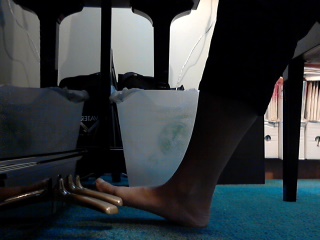
Having multiple camera views for computer assisted music lessons is ideal. Photo by R-M Arca.
My beginner piano students were pretty eager to test how well my computer could handle recording from two cameras simultaneously. It turned out all right. I'll have to fiddle around with the audio settings a bit, but at least my students and I are having fun with these toys as we explore the exciting world of music.Once we get a better handle on things, Skype piano coaching can't be too far away.
Social Media Links
archives
- #YYCArts 32
- #YYCEvents 39
- Collaborative Music 25
- Community 11
- Composing & Arranging 6
- Entertainment 139
- Entrepreneurship 53
- Freebies 3
- Gardening 1
- Geeking Out 65
- Health & Wellness 120
- Improvisation 25
- Interviews 28
- Learning Music 188
- Martial Arts 13
- Memorization 7
- Music 230
- Music Careers 9
- Music Education 196
- Music Examinations 7
- Music Exploration 55
- Music Gigs 14
- Music Lessons 6
- Music Performance 32
- Music Theory 13
- Musical Instruments 12
- Musician Health 19
- Pets 57
- Piano Technique 12
- Practicing Music 120
- Productivity 20
- Professional Development 11
- Recommendations & Reviews 93
- Recreation 71
- Social Media 6
- Spirituality 10
- Studio Management 33
- Studio Technology 50
- Teaching Music 146
FOLLOW THE STUDIO on Instagram








Affiliate Links
As a Sheetmusicplus and CD Japan affiliate, I earn from qualifying purchases. The earnings help fund the Studio’s blog and YouTube channels. Your support is greatly appreciated.


FOLLOW Budo no Tabi on Instagram









