

THE MUSICAL MUSE
Blog dedicated to music education, practice tips, health
&
wellness, and geeking out.
With Music Software, Timing is Everything
I'd like to say that I know my way around a computer. At my last full-time job (for someone else), I was called one of the "super-users". However, I have been experiencing several challenges with my Studio Lab computer. It's operating on Linux Ubuntu and it's not as easy as Mac or as familiar to me as Windows or even Unix or DOS. Linux has some fabulous apps available for education and more specifically, music education and music. For example:
music notation software (e.g. MuseScore)
audio recording and editing (e.g. Audacity)
drum machine (e.g. Hydrogen Drum Machine)
note reader trainers and more
Music and technology has never been so tempting. "Sudo apt-get install" is just so gosh-darn easy to do. Getting the sound set up and audio controls cooperating with all one another? Now there's my technical challenge. Thankfully, some super Linux users have posted some helpful tutorials. The Linux Community Forums have been good too, but having the visuals and working through the steps along with the video helped. It's just been challenging getting the time in to focus on it. The process has made me rethink my roll-out strategy for these music software programs. Rather than having them all available for my students to explore at once, I am going to just roll out a few programs at a time. I have learned that it's important to have Jack Control and those connections set up properly.
After three weeks of on and off fiddling and re-installs, I can say with confidence that Hydrogen Drum Machine, Virtual Midi Piano Keyboard and Score Reading Trainer are playing nicely together in my computer lab.
Life was so much easier when dealing with physical midi and audio cables. Trying to set audio up in a virtual environment has really challenged my learning style.

Using Webcams in Music Lessons
Last year, I purchased an HD webcam for my music studio. My students, their parents and I have enjoyed how easy it is to take a quick video clip or photo of either a hand position or drilling a troublespot in their music.
Last year, I purchased an HD webcam for my music studio. My students, their parents and I have enjoyed how easy it is to take a quick video clip or photo of either a hand position or drilling a troublespot in their music. They get to review it as many times as they need to at home as an unlisted Youtube video.

Computer assisted instruction aids music practice. Photo by R-M Arca
Some of my piano parents really like the overhead camera as it gives them the same view that pianists see when they look at their hands.
This year, we are moving full-steam ahead with computer assisted instruction. Thanks to Memory Express and Best Buy, I was able to take advantage of their huge sale on webcams.
Webcam #2 is positioned to give that all important profile view. It's great for checking posture and ergonomic movement.
.jpg)
Technology in music can be as easy as a $30 HD webcam. Photo by R-M Arca.
It took a while for some of today's students to find Webcam #3. I have a few students who need the pedal view.
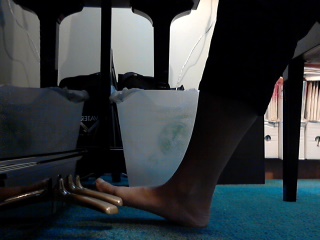
Having multiple camera views for computer assisted music lessons is ideal. Photo by R-M Arca.
My beginner piano students were pretty eager to test how well my computer could handle recording from two cameras simultaneously. It turned out all right. I'll have to fiddle around with the audio settings a bit, but at least my students and I are having fun with these toys as we explore the exciting world of music.Once we get a better handle on things, Skype piano coaching can't be too far away.
Setting up the Studio Computer Lab
Technology and music is a huge area for growth as far as music teaching goes. I recently transformed my old office laptop into a music computer lab.
Technology and music is a huge area for growth as far as music teaching goes. I recently transformed my old office laptop into a music computer lab.
I downloaded various cool (and free) apps from Ubuntu's software center, including:
Score Reading Trainer
GNU Denemo
GNU Solfege
Hydrogen Drum Machine
Linux Multimedia Studio
Virtual Midi Piano Keyboard
Generally, I zoomed in on apps that help students with note reading practice, ear training and rhythm work. The music notation software and audio recording software is to give them something fun to create.
One student was tickled pink that he earned three Maestro Bucks for creating a funky drum loop (and tutored his sister on how to use the program).
The Big Reveal of Virtual Choir 3.0's Water Night
Yesterday was truly a magical day. After going through a rough morning (Murphy's Law prevailed), I was looking forward to seeing the cheerful faces of my students and the "premiere" of Virtual Choir 3.0. Both were the balm that I needed.
My students had heard about me struggling with my submission for Virtual Choir 3.0 (those pesky trouble spots). How apropos that I watched the premiere with two of my music students via Lincoln Center's live stream.
Yesterday was truly a magical day. After going through a rough morning (Murphy's Law prevailed), I was looking forward to seeing the cheerful faces of my students and the "premiere" of Virtual Choir 3.0. Both were the balm that I needed.
My students had heard about me struggling with my submission for Virtual Choir 3.0 (those pesky trouble spots). How apropos that I watched the premiere with two of my music students via Lincoln Center's live stream.
From the moment that lone water drop touched down and we sang our opening chord, the hairs on my arms stood up and my arms tingled. My students and I were just speechless for several minutes:
Our "performance" of "Water Night" by Grammy-winning composer Eric Whitacre, is a feast for the eyes as well as the ears. Spiritually, it's a balm and a booster. Truly magical.
It's a powerful reminder of the power of music, of how art builds community and breaks barriers. A total of 3,746 videos from 2,945 people (singing one or more parts) in 73 countries were submitted.Now pundits can complain about how the cut-offs aren't exact and those "esses" drag on forever, or that we were blended together artificially. To them, I say that the virtual environment is never meant to replace the live environment. Just augment it.
I already sing in my church choir (and play piano AND cajón). I do a bit of collaborating with other musicians. Virtual Choir gives me a new world to explore. Technology to master. "Rehearsals" and "performances" that don't require me to give up teaching time. New repertoire to challenge myself with. New friends.
The singing part of Virtual Choir is only a fraction of the entire experience. I blogged about my Virtual Choir preparation and recording experience here. The real magic of Virtual Choir is "virtual choir makes real connections".
Some Virtual Choir members have been inspired by their experience to join a choir in their neighbourhood. I know of a couple who have signed up for singing lessons as a result of their Virtual Choir experience.
People from my generation may remember having international pen-pals as a child. Now, I have a whole army of pen-pals. With a VC member in numerous timezones, there is always someone available when I am.
We're exchanging gifts, planning visits and so on. I know of one couple who have come together through Virtual Choir.
We celebrate the joys, such as a job interview, a new composition or relationship. We support each other through the rough patches, such as surgery, relationship break-ups and cancer.
I was chatting with some of my choir buddies from the Virtual Choir Army last night and after celebrating the culmination of our hard work with "Water Night", we looked towards the future. Immediately on the horizon is our next multi-track project (singing Morten Lauridsen's "O Magnum Mysterium"). We dreamed about future real-life reunions and Virtual Choir 4.0. We are riding the wave of community and artistry created by Virtual Choir and seeing where it (and technology) will take us next.
So when we see that video, we see the breakdown of barriers. People in isolation coming together. People from countries who aren't on amicable terms singing "beside" each other. We see the we see the growth of those connections. We hear the magic created by people who may never meet, in communion with one another, drawn together to bring the haunting strains of "Water Night" to life.
Bravo Eric! Bravo VC Team! Bravo to all of you, my fellow choristers in Virtual Choir. We've made something truly special here.
Click on image below to check out Eric Whitacre's newest CD, Water Night:


Using the Camera During Music Lessons
This week, my students and I discovered something truly amazing. I was trying to figure out a better position for the tripod. Previously, it sat beside my desk with the camera catching a profile shot.
As some of my readers know, I have been doing audio and visual recordings when I am teaching. At the end of the night, I upload the files to their special recordings page and fire off an email (Thank God for email templates), saying "Your Lesson Audio/Video Clip is up!"It's been working very well since moving to this format. All they have to do is click on the link and they can get a refresher anytime they want. They can even show off to family and friends, near and far.
This week, my students and I discovered something truly amazing. I was trying to figure out a better position for the tripod. Previously, it sat beside my desk with the camera catching a profile shot. That works well - most of the time.
However, this week, I wanted to capture a better view for my students struggling with hand position and keyboard topography.The amazing discovery? Turn the student into a roving camera person when I'm demonstrating (or I'm the roving camera person/interviewer as I get them to piece together a practice plan for the week). Then they can go all around me and zoom in on whatever they feel they need to capture as I explain and demonstrate a practice strategy to them.Now I admit, some videos don't offer the best view. There's a few moments, when the lens is panning the floor or the window but the twinkle in their eye just from being in charge of the camera is something to behold.They have also started to even take photos during the video to capture a hand position.
Some advice: make your students use the neck strap, use a camera that they can handle (and that you're comfortable using for recording lessons) and finally, for really young beginners, pass the camera to the child's parent. After all, it's for their benefit that you're doing the video.
(c) 2010 by Musespeak(tm), Calgary, AB, Canada. All rights reserved.
Social Media Links
archives
- #YYCArts 32
- #YYCEvents 39
- Collaborative Music 25
- Community 11
- Composing & Arranging 6
- Entertainment 139
- Entrepreneurship 53
- Freebies 3
- Gardening 1
- Geeking Out 65
- Health & Wellness 120
- Improvisation 25
- Interviews 28
- Learning Music 188
- Martial Arts 13
- Memorization 7
- Music 230
- Music Careers 9
- Music Education 196
- Music Examinations 7
- Music Exploration 55
- Music Gigs 14
- Music Lessons 6
- Music Performance 32
- Music Theory 13
- Musical Instruments 12
- Musician Health 19
- Pets 57
- Piano Technique 12
- Practicing Music 120
- Productivity 20
- Professional Development 11
- Recommendations & Reviews 93
- Recreation 71
- Social Media 6
- Spirituality 10
- Studio Management 33
- Studio Technology 50
- Teaching Music 146
FOLLOW THE STUDIO on Instagram








Affiliate Links
As a Sheetmusicplus and CD Japan affiliate, I earn from qualifying purchases. The earnings help fund the Studio’s blog and YouTube channels. Your support is greatly appreciated.


FOLLOW Budo no Tabi on Instagram









