THE MUSICAL MUSE
Blog dedicated to music education, practice tips, health
&
wellness, and geeking out.
The Online Scheduling Systems Conclusion
After more than a week and 10-1/2 systems later, a choice has been made. My first impressions and review of Appointy.
After playing around with 10-and-a-half online scheduling systems, I have found one to use in my studio. The winner is....Appointy!
Here's how it fared out against my wish list:
Aesthetically pleasing and intuitive design: It's not the prettiest that I've seen (Book Fresh wins that hands down), but it does look clean and is intuitively designed.
Easy to use – both on the client end and the administrative end: Extremely easy. I booked test appointments as an administrator, staff and client.
The ability to prevent short notice rescheduling: YES!This is customizable!
Various options for reminder notifications that can be customized by each user: To a degree. As an administrator, I have more control over this feature. It looks like SMS reminders cost credits.
The ability to synchronize appointments with several calendar platforms (e.g., iCal, Google Calendar, Outlook, etc.): YES! Just make sure that you synchronize your calendars BEFORE inputting appointments in Appointy or else they won't get synchronized. I learned that the hard way.
The ability to collect and process payments: YES! You need a Paypal account to link it to.
The ability to customize the appearance for branding purposes: You can add your own background photo and your logo.
Various privacy options so that the general public cannot see who I am teaching/consulting with: The default is that you are shown that unavailable times are struck out.
Easy to reschedule appointments (client or me): Extremely easy. Now would you like an email sent to the other party to notify them of the change?
The ability to handle recurring appointments for a set period of time: No problem.
The ability to allow group bookings with a cap: YES!
The ability to set different availability for each day: YES!
Solid tech support resources: I'll say! Amy at Live Chat was very helpful. Email requests take less than 24 hours for a response. You even get a follow up email asking if you are satisfied or still need help.
The ability to specify a time zone for appointments: YES!
Viewable and usable on a desktop and mobile devices: YES!
Advance scheduling: YES!
As a bonus: there's a Wordpress plugin! I also like how clients can log in using their Facebook or Google accounts. Of course, they can just log into their account using their Appointy account as well.
Cost: You get quite a bit with the free version: community support, mobile version, customizable availability, unlimited staff, service & bookings, customer relationship management tools, website integration, client verification, SMS alerts, multiple service booking at the same time, service dependency, reschedule appointments. I leveled up to the Pro Plan at $19.99 USD/month to get recurring bookings and the ability to accept payments.
We're just testing the online booking system right now with lesson re-scheduling and special class scheduling. I need some time to get my brain around the rest.
Other articles in this series: Exploring Online Scheduling Systems and Calendars for my Music Studio | Beginning My Hunt for the Perfect Online Scheduling System | The Quest for the Perfect Online Scheduling System – Part 2
The Quest for the Perfect Online Scheduling System - Part 2
The search for the perfect online reservation scheduler (or in my case, class and lesson re-scheduler) continues...A look at ScheduleThing, Scheduly, Clickbook and Schedule Once.

As some of you have read, I'm exploring online scheduling systems in the hopes of using it in my music studio (read Part One here). It is my hope that it will make rescheduling more convenient for my students' families without it being a headache for me to administer. Also, I want to be able to accommodate ad hoc coaching and make it easier for those students to drop-in.
My Online Scheduling System Wish List
Before presenting the second fleet of booking apps, here once again is my Wish List:
Aesthetically pleasing and intuitive design
Easy to use – both on the client end and the administrative end
The ability to prevent short notice rescheduling
Various options for reminder notifications that can be customized by each user
The ability to synchronize appointments with several calendar platforms (e.g., iCal, Google Calendar, Outlook, etc.)
The ability to collect and process payments (might not use this initially but I’d like to have the functionality in the future)
The ability to customize the appearance for branding purposes
Various privacy options so that the general public cannot see who I am teaching/consulting with
Easy to reschedule appointments (client or me)
The ability to handle recurring appointments for a set period of time
The ability to allow group bookings with a cap
The ability to set different availability for each day
Solid tech support resources
The ability to specify a time zone for appointments (not needed initially but will once I teach online)
Viewable and usable on a desktop and mobile devices
Advance scheduling
Let's get started, shall we?
ScheduleThing has a module just for music teachers. I really like how you can schedule multiple schools, rooms and various equipment. It also could accommodate multiple teachers' schedules. Very slick design. Lots of customization options.
Unfortunately for me, this online reservation system cannot handle payments. Nor does ScheduleThing sync with Google Calendar. So ends my exploration.
Cost: As cheap as the Free version and as pricey as $129/month USD. The free version is good for two resources and only one type of reservation (e.g private music lessons). Go up to the Small Business version for $19.95 USD/month and you get the first month free. You can use up to 10 resources and an unlimited number of reservation types.
Scheduly truly has a lot of bang for your buck For $9.99 USD per month, you get an unlimited number of appointments within an infinite time frame. It can synchronize with several calendar platforms. There are reporting functions, safety features, yadda yadda.
Sadly, it doesn't allow us to put start and end dates, for instance, for a music theory course. As for aesthetics? Well, I've seen nicer ones out there. Again, my search comes to a screeching halt. Next!
I didn't get very far once I learned that this online reservation system could not handle classes. It looked nice and easy to use, however.
The free version gives you one location, unlimited services and service categories, 50 bookings a month, mobile locations and services, booking widget and a customer database - standard fare for the freebie systems. You have to step up to the ClickBiz5 at $19.95 USD/month to get the online payment functionality as well the ability to export your customer history.
I really wanted Schedule Once to work for me. This online appointment schedule has a nice design, easy to use interface, decent tech support and the ability to handle multiple locations and resources. I liked how all bookings could be automatic or with approval.
Schedule Once cannot handle payamets, although the tech support team mention a good workaround. You can get a Paypal button widget which will post a button on your scheduling page that redirects a client to you pay you. The appointment doesn't get confirmed until you receive payment for the service.
Sadly, it does not handle class scheduling.
Plans are very affordable. After your 14-day free trial, you can sign up for the Basic (Free) version, which gives you group scheduling and appointment scheduling with approval. For $5 USD/month, you get group scheduling, booking with approval, productivity features and email reminders.
The Search is NOT Over
I just realized that although I visited SimplifyThis' website and read the features and testimonials, I did not take it for a test drive. It looked promising. However, my booking app search partner mentioned that the system seemed too simplistic. One thing that held me off from exploring it right away was the fact that I couldn't get my brain around paying $18 USD/month to use a system in which a primarily selling point (invoicing and handling bookkeeping) is redundant. Now, if SimplifyThis could talk to my QuickBooks...
There are two other scheduling programs I was thinking of looking at (GenBook and ScheduleVIEW). However, what is fast becoming clear is that I may need to rework my criteria for an online scheduling system. At the very least, I may need to rethink how I want to use the system. At any rate, I plan to take a break from these scheduling programs and instead, explore some of the WordPress scheduling plugins before making a final decision.
Beginning My Hunt for the Perfect Online Scheduling System
My quest begins to find the perfect online scheduling system for my music studio is proving tougher than I originally thought it would be. This installment looks at the first four online booking apps on my Hit List: Appointment Quest, Book Fresh, Acuity Scheduling and Booking Bug.

Last week, I posted about various online scheduling systems available as I'm looking at ways to streamline operations for my music studio. It was basically my To Do List of systems to try out.
Inspired by entrepreneur Larry Keltto's hilarious yet informative review of several booking apps on the market, I tried out several, while honing my Wish List. Here is my search criteria:
Aesthetically pleasing and intuitive design
Easy to use - both on the client end and the administrative end
The ability to prevent short notice rescheduling
Various options for reminder notifications that can be customized by each user
The ability to synchronize appointments with several calendar platforms (e.g., iCal, Google Calendar, Outlook, etc.)
The ability to collect and process payments (might not use this initially but I'd like to have the functionality in the future)
The ability to customize the appearance for branding purposes
Various privacy options so that the general public cannot see who I am teaching/consulting with
Easy to reschedule appointments (client or me)
The ability to handle recurring appointments for a set period of time
The ability to allow group bookings with a cap
The ability to set different availability for each day
Solid tech support resources
The ability to specify a time zone for appointments (not needed initially but will once I teach online)
Viewable and usable on a desktop and mobile devices
Advance scheduling
Oh, and it should be reasonably priced too. Really, is that too much to ask for?
Online Booking Systems - Round One
To date, I've examined nine online scheduling systems - and I'm not done yet. Here, I share my experience with the first four: AppointmentQuest, Book Fresh, Acuity Scheduling and Booking Bug.
This was recommended by a former studio parent. AppointmentQuest has several attractive features. It allows you to securely accept payments online. You get instant email notifications. You can schedule services, people and events in several locations. It's HIPAA compliant.
I played with the Music Studio Demo. Unfortunately, I didn't get very far. The demo wouldn't let me book a test appointment (either as staff or a client). I also didn't like how the public could see all details for an appointment. Call me a prude if you want, but I don't think the general public should be privy to my students' lesson and contact info, regardless of whether they are underage. I also couldn't get over the dated design.
Cost: $6.59 USD/month for the Express version (single schedule/staff, unlimited customers, 300 appointments/month, advance scheduling up to 2 months). There are premium packages available with more features.
This was one of several programs that I really hoped would work out. It was recommended to me by Michael Lipnicki's Fine Pianos. Its free trial was fully functional.
It was one of the slickest designed online systems I tested. It has an attractive user interface that is easy to use. I loved the fact that it could handle class and group scheduling in addition to individual appointments. Calendar syncing was very good. The mobile apps and Booking Widgets are great features.
Unfortunately, Book Fresh couldn't handle course registrations, e.g. registering for a 13-week music theory course from Date A to Date B very well. Clients would have to sign up for each class in the course.
I consulted the Help sections to find a solution, only to see that there was very little information. My new "buddy", the Solopreneur found this too. This brought my test of Book Fresh to a dead halt.
Cost: The Freebie version only allows you to have three bookings per month, only three services and can only be used by one staff person. There are premium packages with more options. For the reminder notifications and calendar syncing ability, payments, you have to go up to the Business plan which is free for 30 days and then $19.95 USD per month after that.
This was one I tried out briefly, left and came back to it wondering, "Why did I stop mid-evaluation?" The free trial let you try it all out.
Acuity has a WordPress plugin - a bonus for my WordPress site. Calendar syncing? Yes. Can it handle one-on-one and class appointments? Yes. Website customization: yes. Handles payments? Yes. Attractive and user friendly interface? Yes.
What was it then that sent me on another tangent mid-evaluation? Oh yes, it couldn't handle course scheduling and booking to my satisfaction. For someone who isn't running courses, then it should work fine.
Cost: The Free version gives you quite a bit. Full customization and one schedule (yours). Go up to the Professional Plan for $10 USD/month and you also get recurring appointments/classes, calendar syncing and automatic time zone conversion. You get more with the Premium plan (of course).
This is the one the Solopreneur selected. It hit all the right buttons: calendar syncing, classes, multiple resources, payments. A bonus: social media integration, mobile apps, accounting and marketing integration, discount pricing options and an exportable customer list.
However, it didn't work nearly as well for me as it did with my app testing buddy. It wasn't letting me choose Google Calendar to sync with. It sent me way too many email notices when making a booking and once again, I was having a tough time setting up a course that runs for a finite period.
However, my brother and colleague reported that it had the most straight-forward user interface out of the ones he tested. I suppose I could have contacted Booking Bug support (excellent resources, from the looks of it).
Who knows? Maybe Booking Bug and I just weren't meant to be friends.
Cost: The Solo plan costs $19.95 USD/month (1 staff, 1 resource, unlimited services, events/classes/courses and unlimited resources). There are two more plans above that.
It was at that point that my brain melted and I needed to take a break. Fresh air and ice cream does the body good. My search continues for the perfect online scheduling app for my students and I.
Exploring Online Scheduling and Calendar Programs for the Music Studio
Looking for an easier way to handle missed lessons. Here are some of my findings of online scheduling options.
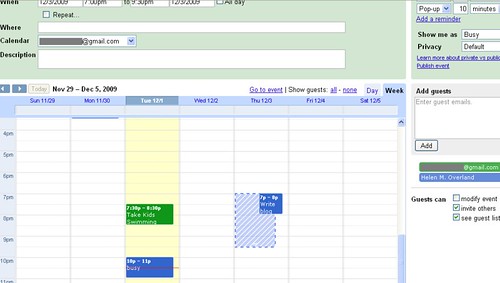
One popular discussion thread in the music teacher groups is the matter of missed lessons and how to handle make-up lessons. Like secondary and post-secondary institutions, tuition is non-refundable or discountable.
Some teachers don't offer make-up lessons for student absences. Period. The client makes the choice what is more important to them that day: Activity X or their music lesson.
Many offer make-up lessons under certain conditions (sufficient notice given, illness, emergency, etc.). Others use a Lesson Swap system. Trade it or lose it. I currently use a variant of the two.
My colleague and friend David Story once mentioned a piano teacher in Texas who only teaches doctors. My first question was "How did he work with their schedules?" Using online scheduling software, the teacher would post his availability for the month on his site. His students, once they received their work schedule for the week, would schedule their lesson online.
It's a neat concept, that has caught the attention of a few teachers in my discussion groups.I hope to do more coaching and eventually offer online lessons, so this function is highly attractive.
With the right program, it can take care of all the little administrative details for you. Or at least, that's what I'm hoping for. It should make it easier for students and their parents to reschedule, without it being a pain in the posterior for the teacher.
Ideally, it will also have a control feature that prevents people from trying to schedule at the last minute. It doesn't work for your dentist or massage therapist. Ergo, it doesn't fly with us either. Although many of us work from home, we are, just like your hair dresser, doctor and masseuse, trying to run a business and keep things on the level.
These are a few free and/or reasonably priced programs that I've come across. Many thanks to my colleague Darrin Hogue and Nicole Lipnicki for sharing what they've also found:
Appointment Calendar (Wordpress plug-in)
Appointment Quest (Click here for the Music Studio Demo)
Booking Calendar & Appointment Scheduler (Wordpress plug-in)
ClickBook (Example: Amy Rabinowitz Music Studio)
Scheduly (Example: Lisa Messi Piano Studio)
Schedule Thing - Music Scheduling Software
Simplify This - Interview & Demo with Music Teacher Allison Buhlman
Snap Appointments (Example: Carroll Gardens Piano Lessons)
The Online Booking Calendar (Wordpress plug-in)
Finally, here's an article that reviews 12 Free Appointment Scheduling Software packages for freelancers.
What is an Audition-Interview?
Before signing up for music lessons, learn what's involved when a music teacher meets with a prospective student and parent(s) for the first time.

Before signing up for music lessons, learn what's involved when a music teacher meets with a prospective student and parent(s) for the first time.
The audition-interview can be a vital part of the selection process when finding a music teacher. It gives the prospective student, the parent (or guardian) and the music teacher the opportunity to gather information needed to make a final decision on where to study. The meeting occurs after first contact (phone/email) between a private music teacher and a prospective student’s family.
Purpose of an Audition-Interview
During the audition-interview, the prospective student and parent can learn more about a music educator’s teaching philosophies and policies. The music teacher uses this meeting to assess the student, the family and determine compatibility.
Determining compatibility is a critical part of the meeting. It’s a case of determining whether the student’s communication and learning style is well-matched to the teacher’s communication and teaching style, determining how well the parents’ vision meshes with the teacher’s and how well all parties “click” with each other.
How to Prepare for an Audition-Interview
Each person involved in the audition-interview has to prepare in advance. A music teacher should have printed copies of his or her studio policies, studio calendar, assessment tools and registration form ready.
A beginner student should think about why he or she is interested in music lessons and why he or she is interested in a specific instrument. A transfer student should practice a couple of pieces learned with his or her previous teacher and review some technical exercises.
Parents of transfer students can prepare for the audition-interview by bringing a copy of their child’s previous exam transcript(s), music books used previously and assignment book. All parents should bring a list of questions and their cheque book.
What Happens at an Audition-Interview?
The audition-interview can take between 30 – 60 minutes. The meeting can be broken down into three sections: Teacher Interview, Assessment and Policies, Philosophies and Final Questions.
During the Teacher Interview, the teacher can direct some questions to the prospective student and the rest to the parent/guardian. Some questions that a music teacher can ask a potential student are:
Why do you want to take music lessons?
What do you like about music?
What are some of your hobbies and interests?
Do you like taking music lessons? (for transfer students)
Are you willing to practice regularly? How much time are you willing to commit?
What would you like to learn?
The following are sample questions that can be directed to the student’s parent or guardian:
What is the setup, practice environment and support structure to help the student organize his or her practice?
What extra-curricular activities does the student have?
What amount of time do you feel is reasonable for daily practice?
Is the student or the family involved in other musical activities?
Why did you discontinue lessons with your previous teacher?
During the Assessment, the teacher may ask a potential student to perform one or two pieces and technical exercises, followed by aural, reading, theory and rhythm questions. This helps the teacher assess technique, musicality and posture.
The teacher may ask the parent to wait in another room during the assessment portion. This gives the music teacher and student an opportunity to see how well they “click” without outside influences or interruptions.
During Policies, Philosophies and Final Questions, the music teacher outlines his or her studio policies with regards to attendance, expectations, rescheduling lessons, termination of lessons and tuition fees. He or she may also present the Studio Calendar at this time.
The music teacher also shares his or her teaching philosophies and approaches with the prospective student and parent(s). He or she may do a walk-through of what happens during a regular lesson.
Finally, the parent and prospective student have an opportunity to ask questions that haven't been answered yet. They can also voice concerns that they would like the music teacher to know.
After the Audition-Interview
All parties should take some time to reflect and review the information they have been given. During this “cooling off” period, one may conclude that the student’s or the family’s goals do not mesh well with the teacher’s methods and teaching style.
Arrangements should be made to follow up after the audition-interview. The final stage is to either complete the registration process with the potential student or have the teacher recommend several other qualified teachers in the area that may better serve the needs of the student and the family.
Taking the time to meet for an audition-interview is a vital part of the process when finding a music teacher. Music lessons are a long-term commitment and investment. Registering with a music teacher is the beginning of what can be a long and fruitful relationship. The audition-interview sets the tone for the relationship.
References:
Color in my Piano: Printables updated: Student Info form, and Student Interview forms (accessed August 4, 2010).
Torney, Helen, “The Professional Studio: Interviewing Prospective Students”, Music Matters, January/February 2002, p. 2 – 4.
Originally published on Suite101.com on August 6, 2010. Updated March 22, 2013. All rights reserved by Rhona-Mae Arca.
Social Media Links
archives
- #YYCArts 32
- #YYCEvents 39
- Collaborative Music 25
- Community 11
- Composing & Arranging 6
- Entertainment 139
- Entrepreneurship 53
- Freebies 3
- Gardening 1
- Geeking Out 65
- Health & Wellness 120
- Improvisation 25
- Interviews 28
- Learning Music 188
- Martial Arts 13
- Memorization 7
- Music 230
- Music Careers 9
- Music Education 196
- Music Examinations 7
- Music Exploration 55
- Music Gigs 14
- Music Lessons 6
- Music Performance 32
- Music Theory 13
- Musical Instruments 12
- Musician Health 19
- Pets 57
- Piano Technique 12
- Practicing Music 120
- Productivity 20
- Professional Development 11
- Recommendations & Reviews 93
- Recreation 71
- Social Media 6
- Spirituality 10
- Studio Management 33
- Studio Technology 50
- Teaching Music 146
FOLLOW THE STUDIO on Instagram



Affiliate Links
As a Sheetmusicplus and CD Japan affiliate, I earn from qualifying purchases. The earnings help fund the Studio’s blog and YouTube channels. Your support is greatly appreciated.


FOLLOW Budo no Tabi on Instagram