THE MUSICAL MUSE
Blog dedicated to music education, practice tips, health
&
wellness, and geeking out.
Using Waveforms in Music Lessons
This week, I tried a new idea out on a student who has trouble playing steadily (and hates the metronome). I showed him our waveforms.
Summer lessons give me a chance to try out new ideas with students. One of my students doesn't pay attention to the rhythm and tempo as carefully as he should. I wanted to find a different way to show him that "steady" and "unsteady" are two different things. Last week, I decided to show him what "steady playing" and "unsteady playing" looks like. Not with the webcams but with the waveforms.
Using Audacity, I recorded both of us playing the same passage. I synchronized them and first asked him to study how well our waveforms lined up. Then, I hit Play.
When I asked him to repeat the passage, he was much steadier!
Using Multiple Cameras in a Music Lesson Demonstration
After reading "On Teaching Piano with Multiple Cameras", one of my readers had mused how wonderful it would be to see a demonstration of using multiple cameras in a music lesson. My student Dylan and I were happy to oblige.
After reading "On Teaching Piano with Multiple Cameras", one of my readers had mused how wonderful it would be to see a demonstration of using multiple cameras in a music lesson. My student Dylan and I were happy to oblige.
Here we are working on a short chord progression from U2's "Stuck in a Moment". I used the three claps at the beginning to synchronize the videos (à la Eric Whitacre's Virtual Choir).
We used the following cameras for this demonstration:
POV Camera on Dylan's head (Top Left): GoPro Hero 2
Profile Camera on the Studio Desk (Top Right): Microsoft HD LifeCam 3000
Pedal Camera (Bottom Right): Canon PowerShot 5S IS (I can't bring myself to retire it completely because it's still a good camera)
Overhead Camera (Bottom Left): Logitech HD Pro Webcam C910
I took a photographer friend's advice and turned off the auto-focus on the two webcams. Another thing I do is try to minimize the number of background programs running on the computer when recording video.
The profile view is essential for checking posture and hand position. The overhead view gives you the musician's peripheral of the keyboard geography. The pedal view is essential with students who are having issues with timing their pedal changes. As for the POV camera - isn't is just fun to see how another musician sees when they play? It's also good for checking where they are focusing.
I will probably swap the positions for the pedal and profile camera.
Now, when a student working on something new, I can show them various perspectives that they can review at their leisure at home. Or perhaps they'd like to show off a newly polished piece to their relatives across the country.
Students, "Record & Review" has never been so easy to do at home. Use any of your portable devices, such as a smart phone, iPod, tablet, netbook, laptop, camera. You can place them at various positions as we have here.
Find out more about how to incorporate webcams into your studio here.
* Special thanks to my student Dylan and his family for granting permission to record Dylan for this demo. *

Using Webcams in Music Lessons
Last year, I purchased an HD webcam for my music studio. My students, their parents and I have enjoyed how easy it is to take a quick video clip or photo of either a hand position or drilling a troublespot in their music.
Last year, I purchased an HD webcam for my music studio. My students, their parents and I have enjoyed how easy it is to take a quick video clip or photo of either a hand position or drilling a troublespot in their music. They get to review it as many times as they need to at home as an unlisted Youtube video.

Computer assisted instruction aids music practice. Photo by R-M Arca
Some of my piano parents really like the overhead camera as it gives them the same view that pianists see when they look at their hands.
This year, we are moving full-steam ahead with computer assisted instruction. Thanks to Memory Express and Best Buy, I was able to take advantage of their huge sale on webcams.
Webcam #2 is positioned to give that all important profile view. It's great for checking posture and ergonomic movement.
.jpg)
Technology in music can be as easy as a $30 HD webcam. Photo by R-M Arca.
It took a while for some of today's students to find Webcam #3. I have a few students who need the pedal view.
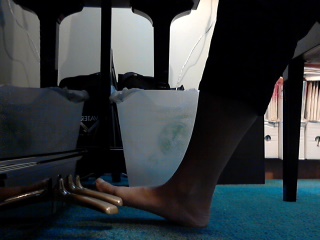
Having multiple camera views for computer assisted music lessons is ideal. Photo by R-M Arca.
My beginner piano students were pretty eager to test how well my computer could handle recording from two cameras simultaneously. It turned out all right. I'll have to fiddle around with the audio settings a bit, but at least my students and I are having fun with these toys as we explore the exciting world of music.Once we get a better handle on things, Skype piano coaching can't be too far away.
World Music Exploration - German Trance Music
Trance music isn't something you'd normally hear at a piano lesson. However, since the idea is to expose students to a wide variety of musical genres, why not?
Trance music isn't something you'd normally hear at a piano lesson. However, since the idea is to expose students to a wide variety of musical genres, why not?
Wisegeek defines trance music as: "an art form that relies heavily on the use of electronic equipment and a specific tempo range, typically 130-160 beats per minute (BPM), to create a musical arrangement that is understood to have somewhat hypnotic qualities." It came onto the scene in the 1990's.There is a set form to trance music. The repetitive melodies are "connected by a series of crescendos and breakdowns." Sounds a bit like minimalist music in a way.
Here is an example of trance music from Germany. Enjoy!
(c) Musespeak(TM), Calgary, AB, Canada. All rights reserved.
World Music Exploration 2010/11 Week 14 - Modern French Music
Exploring modern French music
The Christmas season is usually a bit more hectic for musicians (all those performances). So when I stumbled upon these video compilations covering several musical genres, I jumped on it. There is quite a variety - from rock to pop and from folk to and techno. It's an excellent way to get a taste of the different styles and artists who are firing up the charts.
We will be taking a hiatus from our musical exploration for the Winter Break. Merry Christmas, Happy Hanukkah, Happy Kwanzaa and best wishes for the new year.
(c) 2010 by Musespeak(tm), Calgary, AB, Canada. All rights reserved.
Social Media Links
archives
- #YYCArts 32
- #YYCEvents 39
- Collaborative Music 25
- Community 11
- Composing & Arranging 6
- Entertainment 139
- Entrepreneurship 53
- Freebies 3
- Gardening 1
- Geeking Out 65
- Health & Wellness 120
- Improvisation 25
- Interviews 28
- Learning Music 188
- Martial Arts 13
- Memorization 7
- Music 230
- Music Careers 9
- Music Education 196
- Music Examinations 7
- Music Exploration 55
- Music Gigs 14
- Music Lessons 6
- Music Performance 32
- Music Theory 13
- Musical Instruments 12
- Musician Health 19
- Pets 57
- Piano Technique 12
- Practicing Music 120
- Productivity 20
- Professional Development 11
- Recommendations & Reviews 93
- Recreation 71
- Social Media 6
- Spirituality 10
- Studio Management 33
- Studio Technology 50
- Teaching Music 146
FOLLOW THE STUDIO on Instagram


Affiliate Links
As a Sheetmusicplus and CD Japan affiliate, I earn from qualifying purchases. The earnings help fund the Studio’s blog and YouTube channels. Your support is greatly appreciated.


FOLLOW Budo no Tabi on Instagram